
What's New for Release 2.27
Access the Knowledge Base here.
Sign Up to receive the latest updates on axe Auditor in an email.
What's New for Release 2.27
Enhanced Storage for Screenshots and Media
We’ve upgraded how screenshots and media attachments are stored by migrating them from the application database to Amazon S3. Previously, storing images directly in the database caused rapid growth, increased costs, and slower queries/backups. With this update:
Key Highlights
- All screenshots and attachments are now stored securely in S3.
- Existing media files have been successfully migrated.
- Significant reduction in database size and improved performance.
- No UI or report changes. The transition is seamless for users
- Strengthened data security and improved long-term scalability.
Note: This enhancement is currently available only for private-cloud deployments. On-prem support will be added in a future release.
Manage Issue Severity Access
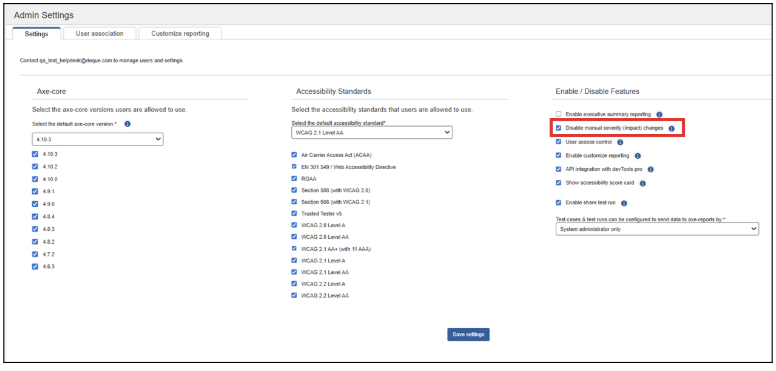
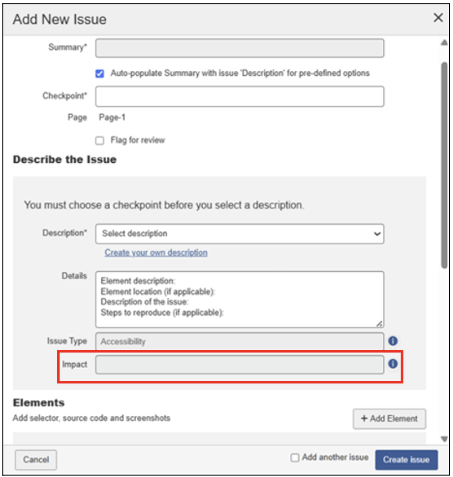
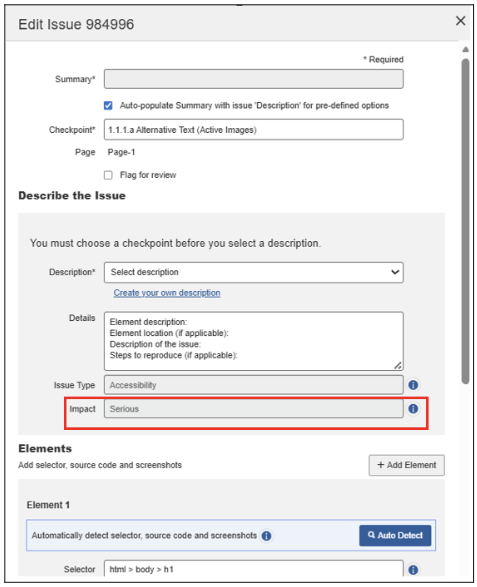
Administrators can now control who can modify issue severity (Impact). A new setting “Disable manual severity (impact) changes” is available in Admin Settings. When enabled:
- Only admin users can edit the severity level (Blocker, Critical, Serious, Moderate, Minor).
- Member users will see the Impact dropdown disabled on both Add Issue and Edit Issue pages.
- Exception: If a user chooses to add a custom issue description, the Impact field will automatically become enabled so they can assign the appropriate severity for the custom issue.
This improves data consistency and prevents unauthorized manual severity changes.
Settings
Add New Issue (Disabled Impact drop-down Field)
Edit Issue (Disabled Impact drop-down Field)
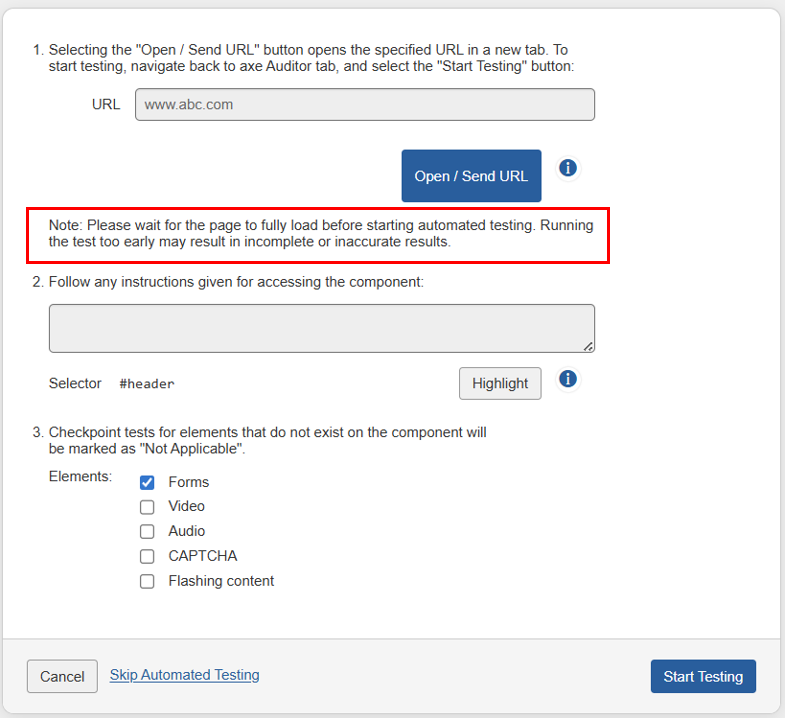
User Guidance Added to Automated Testing
We added a clear instruction on the Skip Automated Testing page reminding users to run automated testing only after all page elements have fully loaded. This helps improve the reliability and completeness of automated testing results.
User Instruction Note
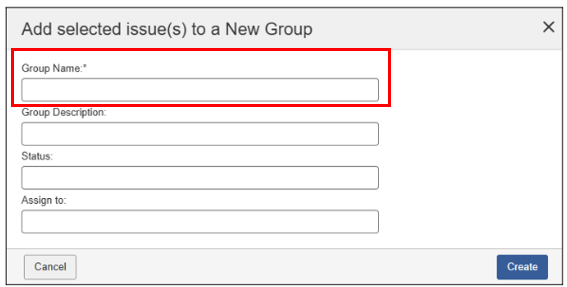
Enhanced Group Naming Support
The Group Name field now supports a wider range of characters, including: Letters (a–z, A–Z) Numbers (0–9) Special characters: (., -, /, _)
This makes it easier to create structured, descriptive group names.
Email Notifications for All Comments
Email notifications can now be triggered for every comment, not only when a user is @mentioned. This enhancement:
- Improves visibility and team collaboration.
- Keeps users updated on all comment activity.
- Allows environment-based configuration of recipient email lists.
Notifications are sent only when the required environment variables are configured.
Configurable language imports
During upgrades, the Deque Way import process now pulls only the languages mentioned to be added by the client, instead of importing all languages by default. This enhancement:
-
Reduces storage usage.
-
Improves processing time during upgrades.
-
Optimizes overall system performance.
Bug Fixes
-
The Accessibility Executive Summary Report has been enhanced for better readability, report accuracy, and overall user experience.
-
On the Add New Component screen in the Sample URL field and the Add New Page/Edit Page screens in the URL field, when users entered a valid website address, the system displayed “URL is not a valid URL” message. This issue has been resolved, and the system now accepts valid URLs without error message.
-
After submitting feedback from the application, the system displayed a thank-you message but failed to trigger the email notification. This issue has been resolved, and email notifications are now sent appropriately.
-
Previously, the Show/Hide button in the Group Preview dialog on the Groups tab of the Issue list page was unresponsive. This issue has been resolved, and the button now works appropriately, allowing users to expand and collapse previews.
-
On the Add Selected Issue(s) to a New Group dialog, when users try to create a new group name with commas, the system displayed “Group name cannot be empty or contain commas” message. This issue has been resolved and users can now create group names that include commas.
-
When using Safari browser, the text-only zoom (150–200%), several layout and truncation issues occurred across axe Auditor, impacting readability and usability for low-vision users. These issues have been resolved, ensuring that text remains fully visible, accessible, and properly aligned at higher zoom levels.
-
Addressed accessibility issues across the application.
Infrastructure Upgrade
-
Deque Way version has been upgraded to 3.21.2
- Advanced rules are now supported while importing issues from devTools Pro
- Language translation issues fixed
- Clause 9 & 10 removed from testing standard EN 301549
-
The axe-core version has been upgraded to 4.10.3.
Known Issues
- Performing automated testing on a component inside an iFrame triggers an error and displays a persistent loading icon.
- On the Issues list page, when users apply the Status filter as Open and the Groups filter as No Group, sorting the list by the Checkpoint column displays no records.
- When a user creates a new test run, selects that newly created test run from the "Product" drop-down filter, and then attempts to archive it, the archive action fails. After clicking "Archive" and entering "1" in the "Select test runs" confirmation field, the system displays "Error Transmitted data" error message instead of completing the archive process.
Browser and Driver Support
The following table describes the minimum and recommended versions on which Axe Auditor is actively tested and best supported.
| Browser | Min Version | Recommended Version |
|---|---|---|
| Chrome | 126.0.64 (LTS) | 142.0.x |
| Firefox | 128.13.0 (ESR) | 145.0.x |
| Safari | 18 | 26.1 |
| Edge | 128.0.27 (ESR) | 142.0.x |
Automated Testing: Supported Browser and Driver
The following table describes the supported browsers, the minimum and recommended versions to perform automated testing in axe Auditor.
| Browser | Min Version | Recommended Version |
|---|---|---|
| Chrome | 126.0.64 (LTS) | 142.0.x |
| Firefox | 128.13.0 (ESR) | 145.0.x |