
Now Available in axe Monitor 8.9
What’s New in Axe Monitor 8.9.0
Create and Edit Scans with the Axe Monitor API
You can now create and update scans programmatically with the Axe Monitor API. Automate scan setup by creating several scans at once with the API. Or, create scans in your CI/CD pipelines and onboarding workflows, keep scan settings consistent across sites, and update scans without stepping through scan settings in Axe Monitor.
Learn more about the Axe Monitor API.
Review Scan Settings via the API
You can now retrieve a scan’s complete configuration by using the Axe Monitor API. Send a GET /scans/:id/settings request with a scan ID to get all settings in a single response. These settings include starting URLs, the accessibility standard, the Axe-core version, crawl depth and page limit, scripts, optimization settings, URL filters, teams, scan groups, and notifications.
Re-run Failed Pages Before Your Next Scan Run
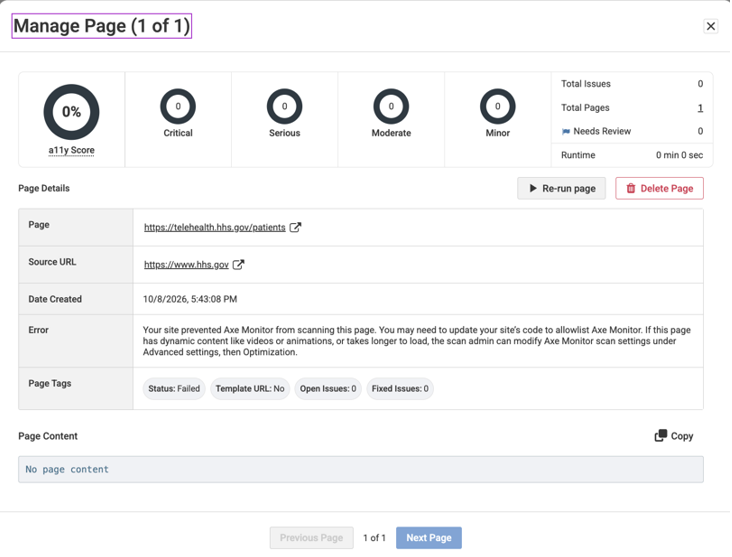
Easily identify failed pages from the scan overview, fix errors, and re-run individual pages without waiting for the next scheduled scan or re-running the entire scan.
Open the new “Failed pages” report on the scan overview. From the Pages view, open the failed page details, review the error, make any necessary changes, and select Re-run Page.
Additional Updates
MS SQL 2025 is now supported on versions 8.9 and higher.
Bug Fixes
- Uploading results on MSSQL on-prem installs sometimes resulted in a timeout error. This is now resolved.
- Large file uploads which were under the 10 MB limit did not successfully upload in rare cases. All valid Axe universal JSON files under 10 MB now upload successfully.
- “Needs Review” issues now show a flag on the same line as the page title or URL to improve readibility.
- On PDF results, the "To solve this issue, you need to…" field now displays remediation guidance.
- When all issues for a selector were marked as ignored, the Selectors table on the Scan Overview page no longer displays "Infinity%" in the Totals column. Ignored issues are excluded from the Selectors table.
- Success criteria now appear as tags in the Issue Details view, and are returned as a separate successCriteria field in the Issue Details and Issue Details for a Scan Run public API responses.
- Security and accessiblity updates were made across the application.
- Issues from uploaded IGT scans are now categorized correctly and consistently with issues from standard scans.
- The scan tag for IGT displays correctly as “Intelligent Guided Test Issue”.
- Monitor MCP no longer lists as a testing standard.
- Scan completion emails included multiple result links without labels, making it difficult for recipients to determine which link to use. The unlabeled link is now labeled "Scan URL" to distinguish it from the public share link.
- Italian translations are improved.
- Fixed UI and text inconsistencies on the Issues page.
- Template URL and associated common components were sometimes cleared when editing scan settings after a preset was applied during scan setup. Template URL and component settings are now preserved, ensuring common components are correctly identified and template pages are generated during scans.
- The Monitor Public API returned a null value for reasonForFailure on pages with a Failed status. This issue has been resolved. The API now returns the reason for failure for failed pages, both when the status=Failed filter is used and when no filter is applied.
Known Issue
- Screenshots are not currently available on uploaded issue results.