
What's New for Release 2.30
Access the Knowledge Base here.
Sign Up to receive the latest updates on Axe Auditor in an email.
What's New for Release 2.30
Axe Auditor Integration with Axe Account
axe Auditor now integrates with axe Account to centralize user access and onboarding across your Deque tools.
What you can do:
- Add users, assign roles (Viewer, User, or Admin), and manage access from a single place in the Axe Account.
- Invite new users by email: once they accept and create an account, they can sign in to Axe Auditor using their Axe Account credentials.
Why it matters: Simplified user management, stronger security, and a consistent sign-in experience across Axe products.
Capture Screenshots for Automated Test Runs
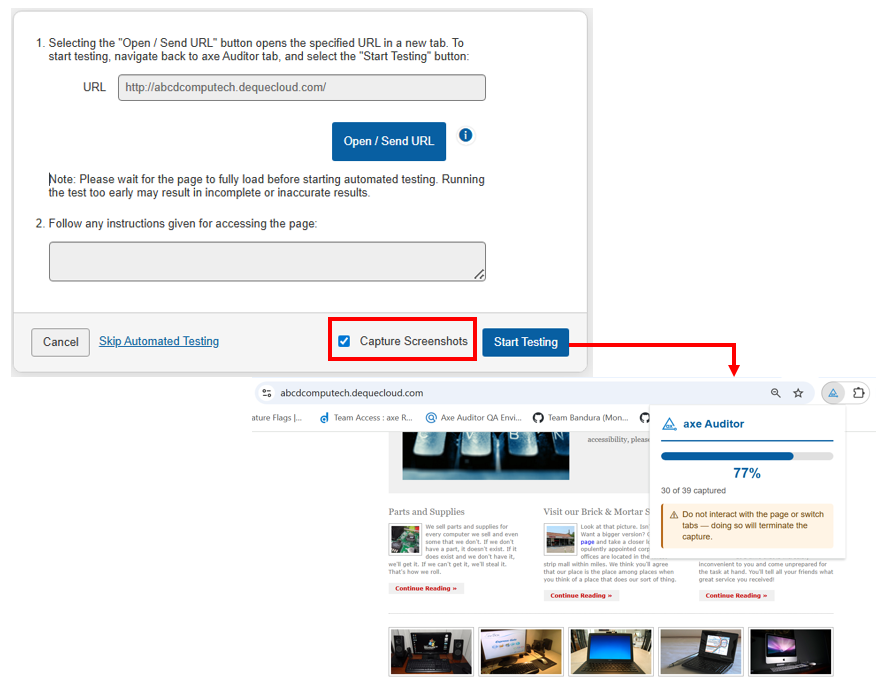
A new Capture Screenshots option on the Automated Testing page captures screenshots during test execution, so you can visually identify accessibility issues without manually inspecting HTML or providing selectors.
How it works: Enable the option before running the test. Screenshots are captured automatically as the run progresses.
⚠️ Do not switch tabs or open other browser windows during the test run. If the session is interrupted, the test stops automatically, and you'll need to rerun the scan.
Why it matters: Less technical inspection, faster issue identification, and a smoother testing experience.
New "Append" Option When Importing Issues
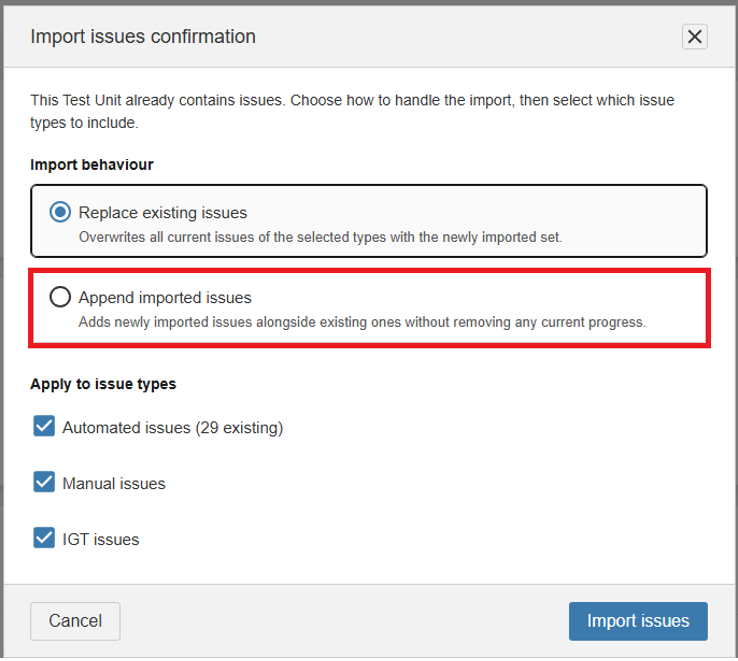
You can now import issues from Axe DevTools into Axe Auditor across multiple sessions without overwriting existing work.
Choose how imports are applied:
| Option | Behavior | When to use |
|---|---|---|
| Replace existing issues (default) | Replaces all current issues of the selected types with the newly imported set. | When you want a clean reset of imported issues.Append imported issues (new) |
⚠️ Heads up: Appending may create duplicates if imported issues overlap with existing ones. Use this option only when you are confident the new import does not contain duplicates.
Issue Status Breakdown on the Test Run Overview
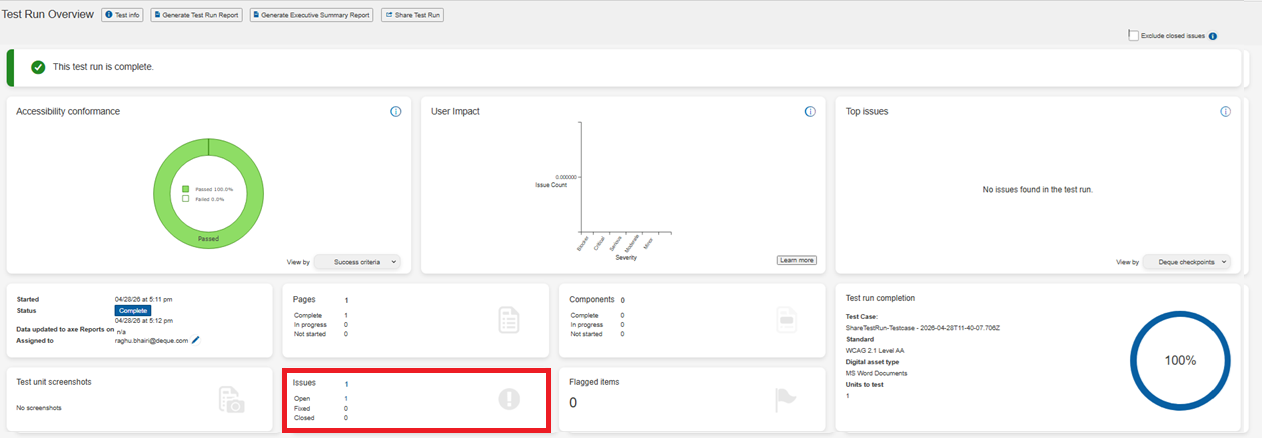
The Issues Logged card on the Test Run Overview page now shows a breakdown by status: Open, Fixed, and Closed. So you can assess the state of a test run at a glance.
Click the link in the card to jump directly to the Issues List page with the filter pre-applied, making it faster to act on issues.
Bug Fixes
This release includes targeted accessibility improvements to Axe Auditor itself, addressing the following WCAG success criteria:
WCAG 2.4.6 - Headings and Labels
- Improved heading hierarchy and label clarity across the application, making it easier for screen reader users to navigate and understand the purpose of form fields and page sections.
WCAG 1.4.10 - Reflow
- Resolved layout issues at higher zoom levels and on narrower viewports, ensuring content reflows correctly without requiring horizontal scrolling.
Infrastructure Upgrade
- Deque Way upgraded to 3.26.4
- axe-core upgraded to 4.11.2
Highlights from axe-core 4.11.2:
- Fewer false positives on Target Size (WCAG 2.5.8): improved handling of inline elements and elements with adjacent inline content, so legitimate touch targets are no longer incorrectly flagged.
- Improved ARIA handling: better support for multiple aria-errormessage IDs, more accurate detection of aria-busy misuse with disallowed children, and elimination of duplicate node reporting in owned-element relationships.
- Clarified Scrollable Region Focusable rule: the rule now correctly identifies that the underlying issue is a Safari-specific behavior, and no longer fails to scroll areas where all content is already visible without scrolling.
Known Issues
- Copying an issue and renaming the screenshot in the copy incorrectly updates the screenshot name in the original issue.
- The filter function does not work on the Checkpoint tab for flagged issues.
- Running automated testing on a component inside an iframe triggers an error and shows a persistent loading icon.
- The Accessibility Conformance chart does not generate results for test runs using the ACAA standard with Mobile Web as the digital asset type.
- On the Issues List page, applying the Status: Open filter with the Groups: No Group filter and then sorting by Checkpoint returns no records.
Browser and Driver Support
The following table describes the minimum and recommended versions on which Axe Auditor is actively tested and best supported.
| Browser | Min Version | Recommended Version | Long Support Channel |
|---|---|---|---|
| Chrome | 144 | 148.0.x | Extended Stable (Win/Mac) |
| Firefox | 140 | 150.0.x | ESR |
| Safari | 18 | 26.4 | |
| Edge | 144.0 | 148.0.x | Extended Stable (Win/Mac) |
Automated Testing: Supported Browser and Driver
The following table describes the supported browsers, the minimum and recommended versions to perform automated testing in Axe Auditor.
| Browser | Min Version | Recommended Version | Long Support Channel |
|---|---|---|---|
| Chrome | 144 | 148.0.x | Extended Stable (Win/Mac) |
| Firefox | 140 | 150.0.x | ESR |