
What's New for Release 2.31
Access the Knowledge Base here.
Sign Up to receive the latest updates on Axe Auditor in an email.
Update 2.31.1
Added support for automated issue translation in additional languages - German, Spanish, French, Italian, Japanese, and Dutch. This option is available for test runs using Axe Core 4.11.4 and later.
What's New for Release 2.31
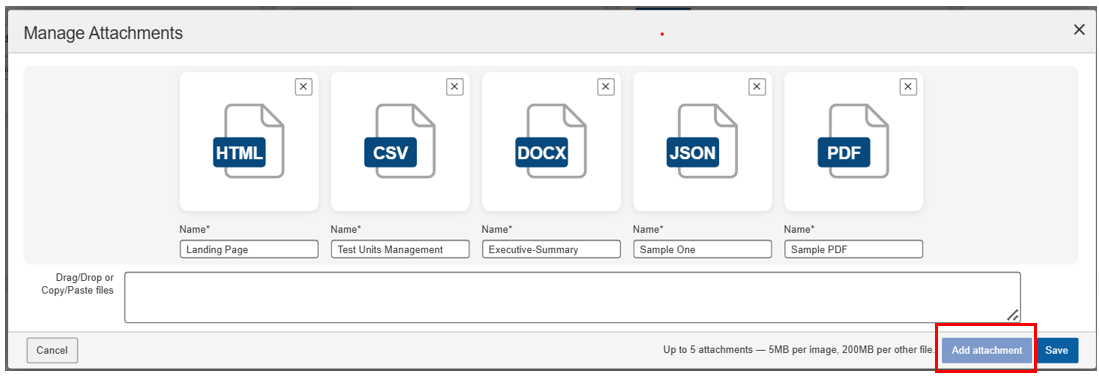
Attach Multiple File Types to Issues
Axe Auditor now supports attaching PDFs, Word documents, Excel spreadsheets, CSV files, and videos to issues and test-unit uploads; in addition to existing image support.
What you can do:
- Attach non-image evidence: screen recordings, accessibility reports, compliance PDFs, annotated spreadsheets directly to issues and test-unit uploads.
- Upload non-image files up to 200 MB. Existing image upload limits are unchanged.
- Download non-image attachments directly from the issue. These files are delivered as downloads rather than opening inline in the browser.
Why it matters: Teams no longer need to rely on external tools or email threads to share supporting evidence. Images, recordings, reports, and documents now live alongside the issue, shortening the time between finding a defect and resolving it.
Assign Rule IDs to Automated and IGT Issues
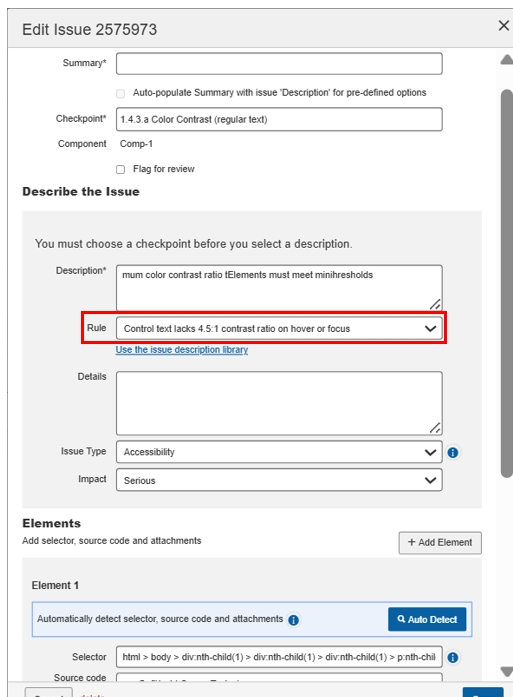
Axe Auditor now includes a Rule field on the Edit Issue dialog for Automated and IGT issues. This closes a long-standing gap: IGT issues imported from the axe DevTools extension came in with custom descriptions but no rule attribution, which meant exports returned null in the rule ID column.
What you can do:
- Use the new Rule drop-down in the Describe the Issue section to assign the appropriate rule to an Automated or IGT issue.
- Pick a recommendation technique from the Rule drop-down to populate Recommendation to fix, or write your own remediation steps in that field.
Why it matters: Exports of Automated and IGT issues now carry rule attribution instead of null values. A foundational requirement for generating VPATs from Auditor data and a meaningful improvement for any downstream reporting or issue-tracker integration that depends on rule mapping.
Note: Applies to Automated and IGT issues only.
Session Timeout Field Now Optional
On the Test Case creation screen, the Session timeout field is now optional. Based on customer feedback that the field rarely served a practical purpose, we have removed the requirement to populate it.
Bug Fixes 2.31
- Archive blocked by product filter: Users can now archive a test run when a product filter is applied.
- Audit report missing closed-issue exclusion: The Audit report now offers the option to exclude closed issues, matching the behaviour already available in test run reports.
- Server error when renaming a test run: Resolved an intermittent server error that occurred when updating the name of a test run.
- Spurious testing-standard validation on mobile imports: Removed the testing-standard validation for mobile issue imports. Mobile uses a custom standard and does not send a testing standard, so the validation was incorrectly blocking valid imports.
Infrastructure Upgrade
- Deque Way upgraded to 3.26.6
- axe-core upgraded to 4.11.4 (from 4.11.2). This includes upstream false-positive fixes; you may see small changes in automated issue counts on subsequent scans.
Known Issues
- The Download button for non-image attachments announces an incorrect accessible name ("View full size Opens in a new tab") that does not match its visible label or behavior.
- Copying an issue and renaming the screenshot in the copy incorrectly updates the screenshot name in the original issue.
- The filter function does not work on the Checkpoint tab for flagged issues.
- Running automated testing on a component inside an iframe triggers an error and shows a persistent loading icon.
- The Accessibility Conformance chart does not generate results for test runs using the ACAA standard with Mobile Web as the digital asset type.
- On the Issues List page, applying the Status: Open filter with the Groups: No Group filter and then sorting by Checkpoint returns no records.
Browser and Driver Support
The following table describes the minimum and recommended versions on which Axe Auditor is actively tested and best supported.
| Browser | Min Version | Recommended Version | Long Support Channel |
|---|---|---|---|
| Chrome | 144 | 148.0.x | Extended Stable (Win/Mac) |
| Firefox | 140 | 150.0.x | ESR |
| Safari | 18 | 26.4 | |
| Edge | 144.0 | 148.0.x | Extended Stable (Win/Mac) |
Automated Testing: Supported Browser and Driver
The following table describes the supported browsers, the minimum and recommended versions to perform automated testing in Axe Auditor.
| Browser | Min Version | Recommended Version | Long Support Channel |
|---|---|---|---|
| Chrome | 144 | 148.0.x | Extended Stable (Win/Mac) |
| Firefox | 140 | 150.0.x | ESR |