
Uploading Attachments to an Issue
Uploading attachments to an issue leverages a simple "browse for / upload" process. You can attach PDFs, Word documents, Excel spreadsheets, CSV files, and videos directly to issues.
The supported file types are:
- Images: JPEG, PNG, GIF — 2 MB
- Video: MP4, WebM, MOV, AVI — 200 MB
- Documents: PDF, Word (.doc, .docx) — 200 MB
- Spreadsheets: Excel (.xls, .xlsx), CSV — 200 MB
- MIME types: JSON, XML, JavaScript — 200 MB
You can upload a maximum of 15 attachments per issue.
To upload attachments:
You can upload attachments using either the Auto Detect feature, the drag/drop or copy/paste feature, or the upload attachments feature from your system to the issue for a checkpoint.
The Auto Detect button is used to automatically detect and add the attachment for an element. When you click the Auto Detect button, the URL opens in a new tab in the same browser. In the new tab, select the element you want to add to be automatically included as an element.
To add multiple attachments manually, you have the following two methods:
-
Drag/Drop or Copy/Paste files: You can copy and paste the desired attachments ( PDFs, Word documents, Excel spreadsheets, CSV files, and videos) from the clipboard memory, or drag and drop the attachments from your system to the issue here.
-
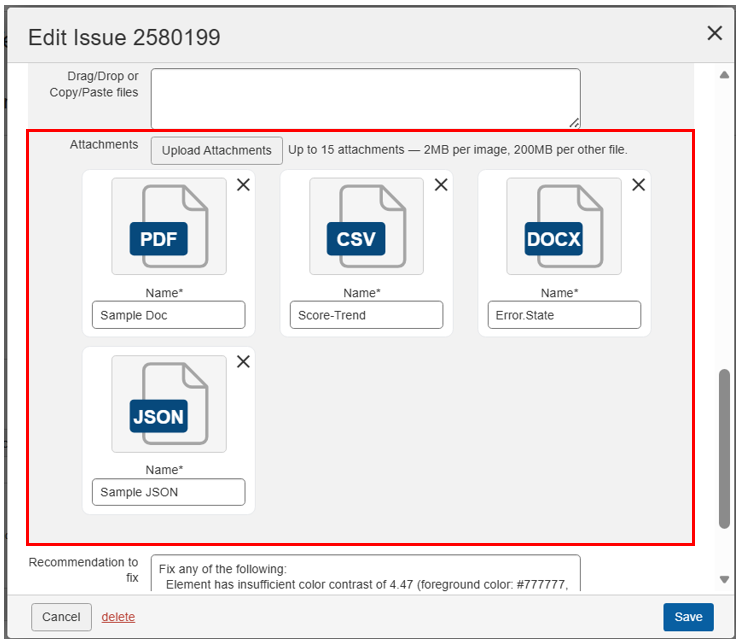
Upload Attachments: To the left of the Attachments field on the Edit Issue dialog box, click the Upload Attachment button.
-
The Open dialog box pops up with file management tools for finding and choosing the desired attachments for uploading from a local or network drive.
-
Locate and select the desired attachment file(s) from your computer (for example, using Chrome, browse for, then highlight to populate the File name field, then activate the Open button)..
A thumbnail of the attachment file(s) are displayed under the Attachments field (with an X at the top, right corner for removing), and the Name field is automatically populated with the name of the attachment file.
-
Click the Save button.
The Add/Edit Issue popup window closes, and you are returned to the Issues for
screen. The attachment remains a part of the issue record (and will be visible upon editing the same issue again). -