
Now Available in axe Monitor 8.7
What’s New in Axe Monitor 8.7
Uploads now apply to future scan runs
Managing manual testing results — especially Intelligent Guided Tests (IGTs) — is now simpler and more reliable. When you upload issues to Axe Monitor from the Axe DevTools browser extension or another Axe product, those issues will be available in future scan runs. This is helpful when teams perform manual tests less frequently than their scan runs in Axe Monitor. Your uploaded results will be available in your most recent scan run in Axe Monitor.
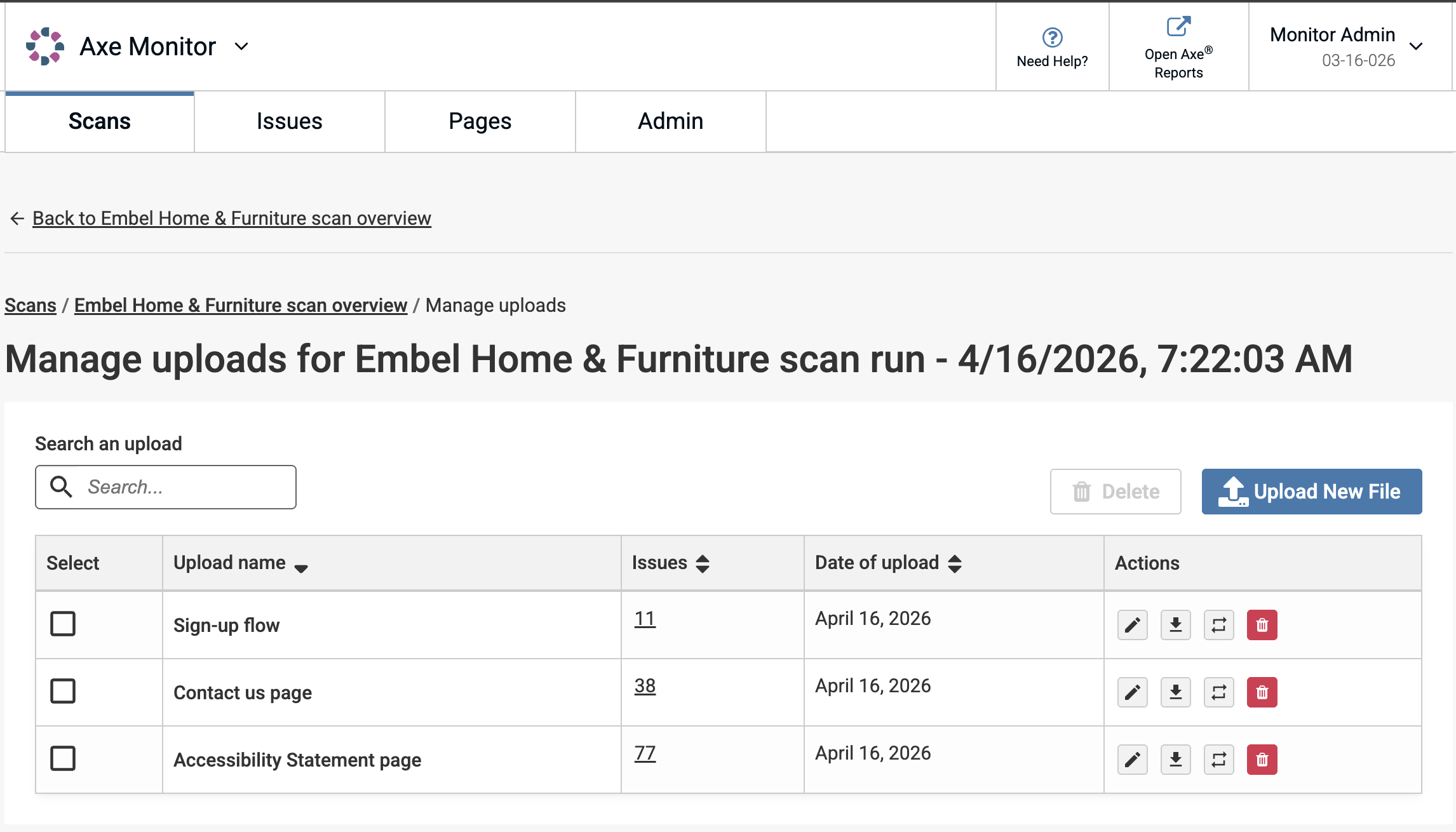
More improvements to uploaded issues
- Apply a user-friendly upload name
- Filter issues by individual uploads
- Rename, replace, download, or delete uploaded files and their issues.
- Centralized view to manage uploads
Learn more about uploading issues
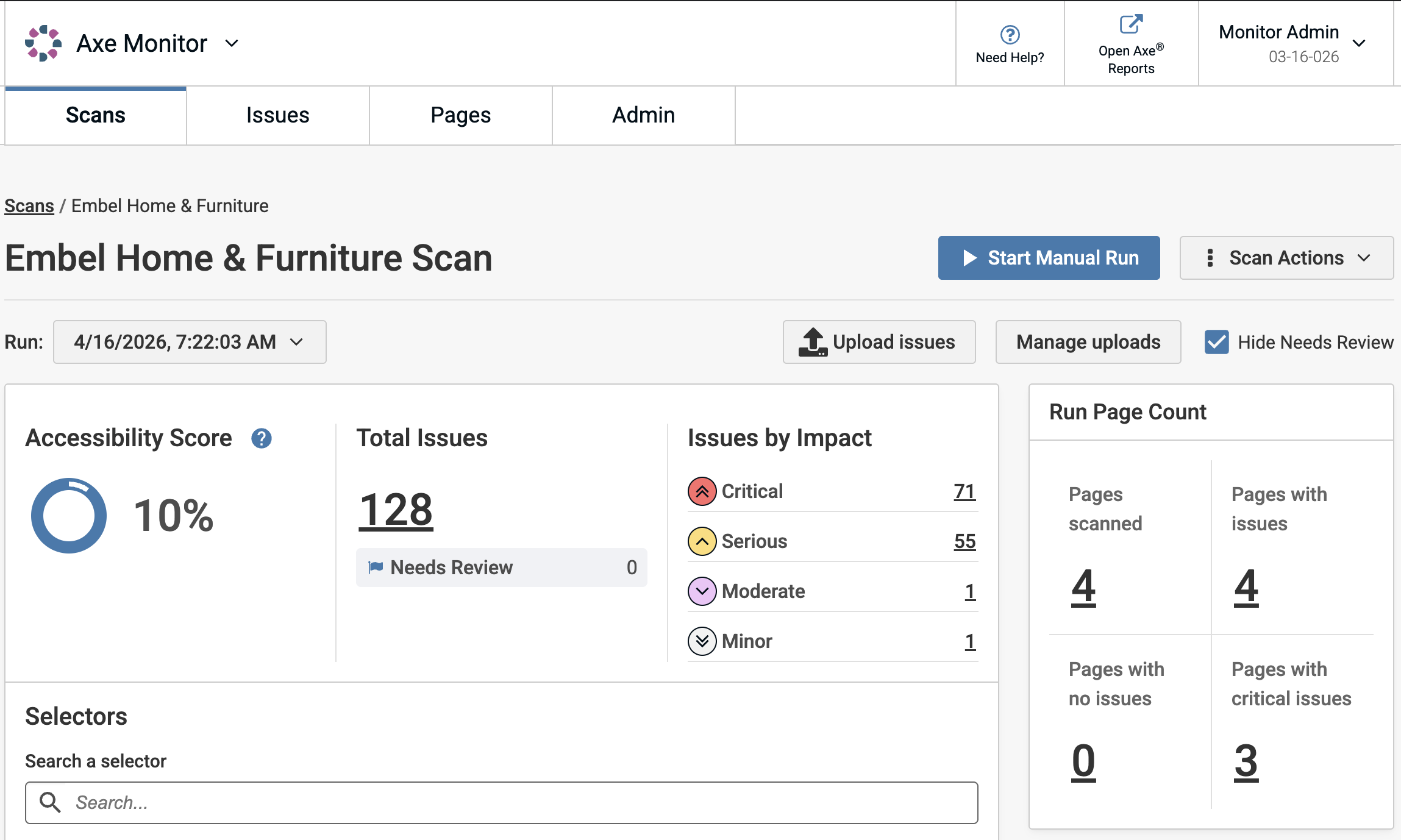
Scan Overview user experience improvements
- Scan Overview now has scan actions and run options organized in a user-friendly toolbar at the top of the page.
- Accessibility score and issues by impact were rearranged for a cleaner visual experience.
- Accessibility score now displays with two decimal places, showing more granular progress over time.
- The selectors table now shows 5 rows by default instead of 10, to reduce scrolling. This section is useful to help you prioritize by selectors – fix single lines of code with the most accessibility issues to maximize results.
- When the PDF target setting is applied, the scan overview now shows a progress indicator for scanning PDFs while the scan is running.
More Control Over Authentication and Scripting
Authentication scripts and user flow scripts can be run on the same scan. You can also control whether or not you want your log in to run before any user flow scripts. This option can be helpful if you require user consent to enter a site, or for handling cookie banners.
Additional Update
- The new Deque logo now shows in Axe Monitor.
Bug Fixes - 8.7.2
- Issues can now be uploaded to a scan without a prior scan run. Uploading a file now creates a scan run and displays the uploaded issues on the Scan Overview page.
- For on-prem instances using MSSQL, loading time was improved on large scans.
Updates - 8.7.1
-
Optimization scan settings (in the advanced section) were improved to better handle dynamic content like image fade-ins, animations and embedded videos. You can now control how long Axe Monitor waits before scanning dynamic content, ensuring that content such as animations, image fade-ins, lazy-loaded components, embedded media, and JavaScript-rendered elements are fully tested for accessibility issues. This improvement eliminates false positives, and ensures accuracy of results. Learn more about the new optimization settings
-
Optimization settings can now be applied to a defined set of pages instead of all pages. This allows scan admins to improve accuracy on pages that need optimization, without increasing the scanning time for the whole scan.
-
The user experience was improved for adding wait time to pages. Wait time can now be added as whole seconds. Settings previously entered as milliseconds were converted to seconds.
-
Axe core 4.11.4 is now available in Axe Monitor.
-
Scan Group names can now have up to 75 characters.
Bug Fixes - 8.7.1
- Scans with starting URLs that contain special characters, like ?=, &, and “”, can now be edited without URL corruption.
- Sites that use 'dwMarker' tags to track information for Salesforce can now be scanned.
- Axe Monitor customers with multiple enterprises under one instance can now successfully send data to Axe Reports.
- In rare cases, scanning timed out on some PDFs. This has been resolved and affected PDFs are successfully scanned.
Bug Fixes - 8.7.0
- Schedule preview dates in scan settings are now showing correctly for monthly scans.
- Radio buttons were occasionally not functioning well when creating or editing a scan. This is now fixed.
- Axe Monitor now permits URLs to be scanned when they require a ‘/’ at the end of the URL in order to load.
- On Scan Overview, the Issue Groups previously linked to filters which excluded common component issues. This bug has been corrected and all issues related to the selected category now show at the link, regardless of whether they are related to common components.
- Japanese translations were improved across Axe Monitor, especially for error messages and the screen reader user experience.
- Accessibility was improved when deleting scans and presets at 200% and 400% zoom levels.
Known Issues
- “Public Share Links” are only available once a scan run has been completed.
- Users with the Scan viewer permission are not able to assign issues to other users.
- “Comment” field content on individual issues does not currently persist across scan runs.