
What's New for Release 2.29
Access the Knowledge Base here.
Sign Up to receive the latest updates on axe Auditor in an email.
What's New for Release 2.29
Enhanced Storage for Screenshots and Media Attachments
This release introduces a significant infrastructure improvement for on-premises clients. Screenshots and media attachments are now stored in the file system rather than the application database, addressing longstanding concerns around database growth, query performance, and backup overhead without any impact to end-user workflows or reporting.
Key Highlights
- All screenshots and attachments are now securely stored in the file system.
- Existing media files are automatically migrated to the new storage location, no manual action is required.
- Significant reduction in database size, resulting in faster queries and backups.
- No changes to the user interface or reports. The transition is fully transparent to end users.
- Improved long-term data security and platform scalability.
Note: This enhancement applies to on-premises deployments only.
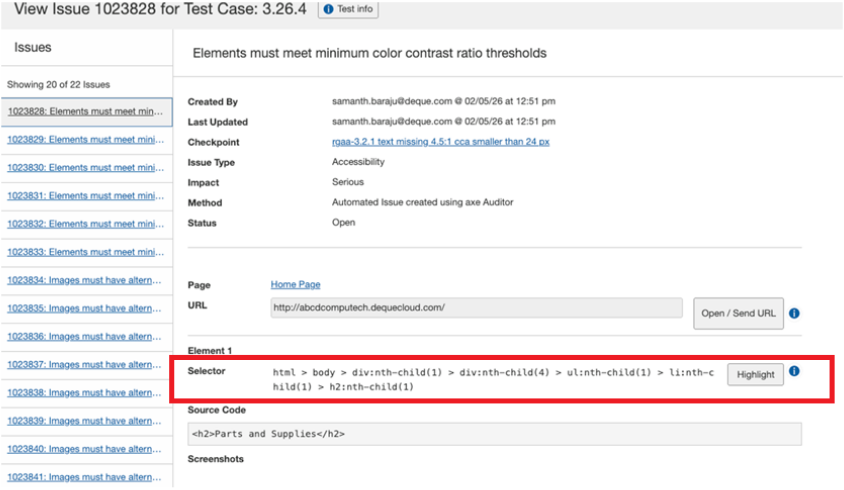
Full Selector Value Display on Issue Details
The Selector field on the Issue Details page now displays its complete value, regardless of length. Previously, long selector strings were truncated within the available display area, making it difficult to review or copy complete values during audits and user validations. The full selector is now visible directly in the interface, eliminating the need for workarounds and reducing friction during detailed issue review.
Selector Field Enhancement
Configurable Session Timeout
Administrators can now set a custom session timeout value for axe Auditor independently of the central authentication system. Previously, session duration was governed exclusively by the organization’s central auth configuration and could not be adjusted at the application level. The timeout value is specified in minutes and can be configured both at the time of upgrade and at any point thereafter. Note that a server restart is required for any changes to take effect.
Bug Fixes
- Groups tab server error resolved. Creating a new group, assigning an issue to it, and navigating to the Groups tab previously resulted in a server error. The Groups tab now loads correctly under these conditions.
- Screen reader announcements corrected for Issues table. Column headers in the Issues table were incorrectly announcing “sortable” for every data cell when navigating with a screen reader. Sort state is now announced only on column header cells, eliminating redundant announcements during table navigation.
- Targeted accessibility improvements across the application. The following WCAG success criteria have been addressed in this release:
- 1.3.1 – Info and Relationships
- 1.4.4 – Resize Text
- 1.4.10 – Reflow
- 2.1.1 – Keyboard
- 2.4.3 – Focus Order
- 2.4.6 – Headings and Labels
- 2.4.7 – Focus Visible
- 3.3.2 – Labels or Instructions
Known Issues
- When a user copies an issue and changes the screenshot name in the copied issue, the screenshot name in the original issue is also incorrectly updated.
- The filter function fails to work on the Checkpoint tab for flagged issues.
- Performing automated testing on a component inside an iframe triggers an error and displays a persistent loading icon.
- The Accessibility Conformance chart fails to generate results for test runs using the ACAA testing standard and Mobile Web as the digital asset type.
- On the Issues list page, when users apply the Status filter as Open and the Groups filter as No Group, sorting the list by the Checkpoint column displays no records.
Browser and Driver Support
The following table describes the minimum and recommended versions on which Axe Auditor is actively tested and best supported.
| Browser | Min Version | Recommended Version |
|---|---|---|
| Chrome | 126.0.64 (LTS) | 146.0.x |
| Firefox | 128.13.0 (ESR) | 149.0.x |
| Safari | 18 | 26.4 |
| Edge | 128.0.27 (ESR) | 146.0.x |
Automated Testing: Supported Browser and Driver
The following table describes the supported browsers, the minimum and recommended versions to perform automated testing in axe Auditor.
| Browser | Min Version | Recommended Version |
|---|---|---|
| Chrome | 126.0.64 (LTS) | 146.0.x |
| Firefox | 128.13.0 (ESR) | 149.0.x |