
What's New for Release 2.32
Access the Knowledge Base here.
Sign Up to receive the latest updates on Axe Auditor in an email.
VPAT Generation in Axe Auditor
Generate, review, and deliver Voluntary Product Accessibility Templates (VPATs) directly in Axe Auditor; no external tools, no manual data transfer, no offline document editing.
Previously, turning an accessibility assessment into a VPAT meant exporting your data to a separate utility, editing the document offline, and sharing the final file with customers by hand. That added work, introduced room for inconsistency, and left enterprise teams dependent on internal resources to manage every VPAT. The new workflow keeps the entire process from generation through publication inside Axe Auditor.
What you can do:
-
Create a VPAT from an existing test case or test run.
-
Set the product details: product name and platform type in a short, guided wizard (Check scope → Edit details → Review).
-
Select the conformance standard the VPAT reports against. Choose a WCAG version at Level AA, optionally combined with the regulatory framework(s) you need:
- WCAG 2.2, 2.1, or 2.0 Level AA
- Otionally paired with Section 508, EN 301 549, or both
-
Send the VPAT for review: Submitting a draft locks it from further editing and moves it into the review pipeline.
-
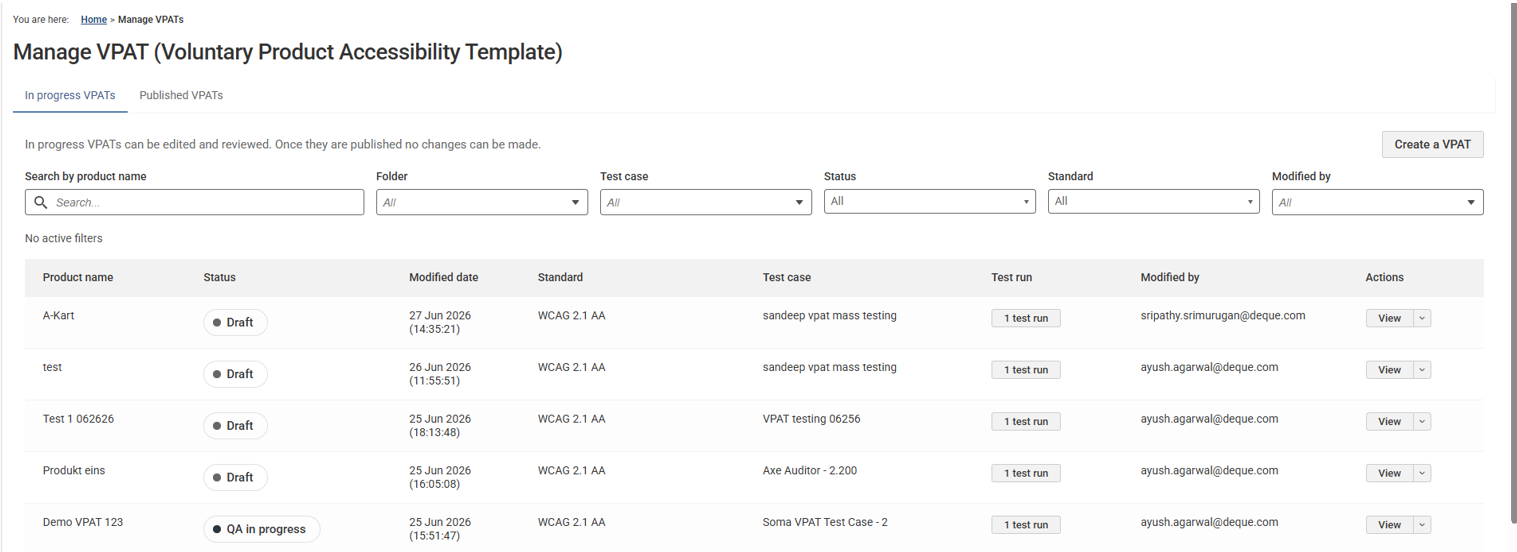
Track every VPAT: in-progress and published from a single view.
-
Download the VPAT as a Word file at any stage, from draft through publication.
The review pipeline Every VPAT moves through three stages:
Draft → Review → Published
A draft stays fully editable until it's sent for review. At each review stage, the reviewer can approve the document and advance it, or reject it with comments and return it to the author for revision. Once a VPAT reaches Published, it's final and ready for client delivery.
The review occurs entirely within the organization that owns the assessment. For Deque-managed audits, the Services team authors and reviews the document; for self-service assessments, your own team fills reviewer roles. The author and reviewers always sit on the same side, no document leaves your organization for sign-off.
Who this is for
- Authors (Accessibility Consultants or enterprise customers): generate a VPAT after completing an assessment, set the standard and scope, and submit it for review.
- QA reviewers: validate that the VPAT accurately reflects the assessment findings, then approve it or return it with comments.
- Project managers: provide final sign-off, confirm the VPAT is ready for the client, and publish it.
Why it matters The VPAT is typically the final deliverable of an accessibility assessment. The document that tells a customer how conformant a product is. Producing it outside the platform costs time and invites transcription errors with every hand-off. Now the create-review-approve-publish loop lives where the assessment data already does, so teams (including enterprise customers running their own assessments) can produce and deliver a finished VPAT without leaving Axe Auditor or depending on external tools.
Manage VPAT Dashboard
Known Issues
-
When a user copies an issue and changes the screenshot name in the copied issue, the screenshot name in the original issue is also incorrectly updated.
-
The filter function fails to work on the Checkpoint tab for flagged issues.
-
Performing automated testing on a component inside an iframe triggers an error and displays a persistent loading icon.
-
The Accessibility Conformance chart fails to generate results for test runs using the ACAA testing standard and Mobile Web as the digital asset type.
-
On the Issues list page, when users apply the Status filter as Open and the Groups filter as No Group, sorting the list by the Checkpoint column displays no records.
Browser and Driver Support
The following table describes the minimum and recommended versions on which Axe Auditor is actively tested and best supported.
| Browser | Min Version | Recommended Version | Long Support Channel |
|---|---|---|---|
| Chrome | 144 | 148.0.x | Extended Stable (Win/Mac) |
| Firefox | 140 | 150.0.x | ESR |
| Safari | 18 | 26.4 | |
| Edge | 144.0 | 148.0.x | Extended Stable (Win/Mac) |
Automated Testing: Supported Browser and Driver
The following table describes the supported browsers, the minimum and recommended versions to perform automated testing in Axe Auditor.
| Browser | Min Version | Recommended Version | Long Support Channel |
|---|---|---|---|
| Chrome | 144 | 148.0.x | Extended Stable (Win/Mac) |
| Firefox | 140 | 150.0.x | ESR |