
Issue Details
From the Issues page, to get more details on an issue, select the arrow icon. Expanding an issue will show each page where this issue occurs, along with the CSS selector, found date, and status.
Select the eye icon to drill into Issue Details. A modal appears with the issue title.
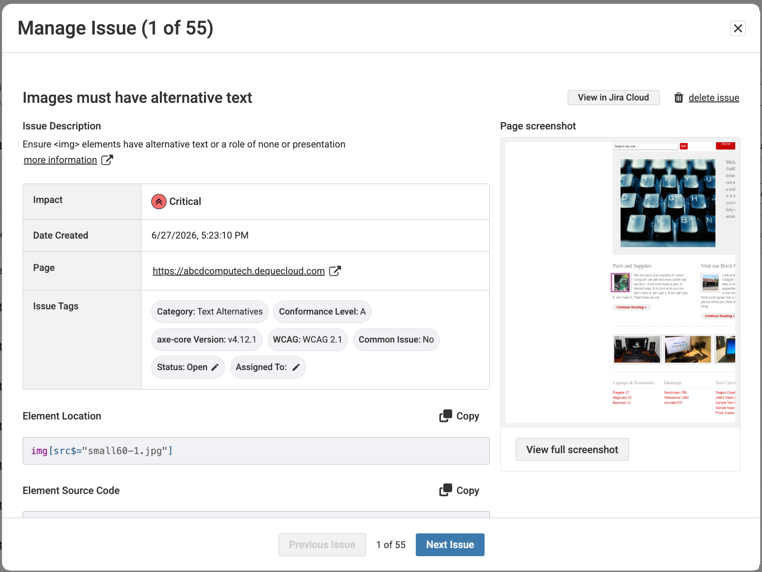
-
The issue title, description, screenshot, and element location provide important context on what the issue is, and where it is located on the page.
-
In the issue description section, select “more information” for additional help from Deque University.
-
To view the area of the page where the issue occurs, select the “View full screenshot” button. A purple and white rectangle on web issues, and a purple and white arrow on PDF issues highlights the location.
| Field Name | Description |
|---|---|
| Impact | Critical, Serious, Moderate, or Minor. |
| Date Created | The date and time the issue was first found. |
| Page | The page on which the issue was found. |
| Issue Tags | Category, Conformance Level, Testing Standard, axe core version, Common Issue, Status, Assignee. Status and Assignee are modifiable. Note: If you’re testing with the RGAA testing standard and best practices, WCAG best practices will show in results. |
| Status | Mark an issue fixed or ignored to remove it from the open issue count. Issues that are not actually fixed will reappear as “open” on the next scan run. Issues that are “ignored” will not reopen on the next scan run, even if they exist. |
| Issue Description | Select the more information link to view any additional information about the Issue including remediation guidance. |
| Element location | The location of source code for HTML issues. Use the copy button to copy the element source code. |
| Element Source Code | A snippet of source code for HTML issues. Use the copy button to copy the element source code. |
| Comments | Add any relevant notes and select Save Comment. Users who have access to this scan can review your comments. |
| Remediation Comments | Add any remediation notes and select Save Remediation Comment. Users who have access to this scan can review your comments. |
Issue Detail Actions
Jira Integration: If your organization has Jira integrated in Axe Account, a button to send or view in JIRA will be displayed.
Delete issue: Deleting an issue will remove it from your current scan run. The issue will reappear if it is found in your next scan run.