
Now Available in axe Monitor 8.8
What’s New in Axe Monitor 8.8
June 30, 2026
Improved experience on Scans List, Issues, Pages
Axe Monitor now features a wider width on tables and dialogs, and updated styling across several views. Key actions remain in the same place, but some button text has changed.
Learn more about the updated user experience:
Prioritize faster and create scans from your AI agent
The Axe Monitor MCP server, which was released earlier this year with an early access program, is now available generally for all SaaS customers.
Set up scans and adjust settings – without ever leaving your AI agent. Easily integrate scanning into your existing AI workflow.
Skip time-consuming issue analysis – get what’s changed between scan runs, and which issues are important to fix first, eliminating weeks of traditional analysis time.
Get from scan to remediation faster - Generate an actionable sprint plan with engineer-ready guidance, so that you can get fixes to production faster.
Note: An Axe Monitor admin must first upgrade to Axe Monitor version 8.8 before starting setup
Screenshots on automated results
Axe Monitor scans can now capture full page screenshots with highlighted issues on web and PDF results, providing your team with the context needed to locate and remediate accessibility issues efficiently. The option is turned on by default for new scans and available under “Advanced Settings” on Presets and Scan Settings.
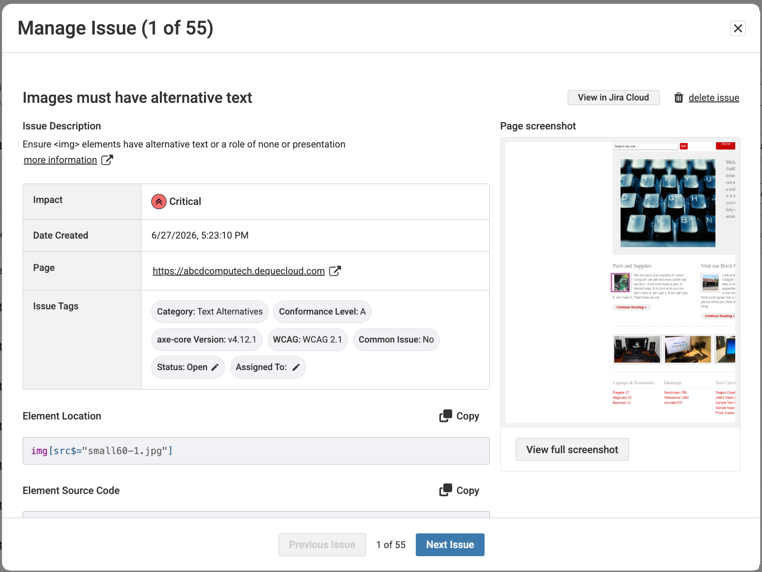
Note: For existing scans, screenshots are not enabled by default. Screenshots provide important context for your team, but they will increase scan run time by about 5-20%.
Issue Detail with unique URL, linked in exports
Easily link to issue details when you’re working on fixing accessibility issues with your team. When issue details are opened, the browser now generates a direct URL to the issue, containing the issue ID. And, CSV exports now include direct links to issue details, making it easier to access screenshots and issue context when sharing or working from exported reports.
Updates to Scan Settings
- Individual steps on scan settings are now clickable, allowing scan admins to quickly adjust individual settings.
- When editing a scan, the “Review” step displays, providing an overview of all settings for easier findability.
- The “General” step was improved to explain the benefits of scanning a user flow with a script.
- Description improved for “Log-in details and other saved values.” This section previously referred to environment variables in technical depth.
Improved message when scanning services are unavailable
If you have scans that have been running longer than expected due to a problem with Axe Monitor, a message will display – “Scanning services are unavailable. Contact Helpdesk.”
Note: The new message only shows when there is an active problem that requires troubleshooting. This section no longer displays a “System Down” message, which sometimes appeared too frequently.
Bug Fixes 8.8.4
- Improved translations for Japanese, Spanish, Italian, French, Finnish and German.
- Strengthened security to block additional inline javascript injections.
- In rare cases, scans failed to start with a session creation error, "Scan run couldn't complete." This is now fixed, and upgrading to 8.8.4 will resolve the issue.
- 403 error messages are now more accessible to screen reader users.
- Efficiency improvements made to reduce time during on-prem installs.
- Improved response times when using the Axe Monitor MCP integration.
- Previously, Axe DevTools CLI .json files were not compatible with Axe Monitor. This has been resolved, and newly generated .json files can be uploaded.
- The most recent version of Axe DevTools CLI is now available for download from Axe Monitor.
Bug Fixes 8.8.3
- Fixed a security issue that allowed guest tokens from public share links to access data outside the shared scan. Guest tokens now provide access only to the shared scan.
- Strengthened URL validation during scan creation to prevent scans from targeting internal or restricted network addresses.
Updates 8.8.2
- Resolved an issue where some pages failed with proxy-connection errors.
Updates 8.8.1
- In “Optimization” settings, the content wait time can now be configured up to 3 minutes, or 180 seconds. If your dynamic content takes longer than 3 minutes to load, contact Helpdesk to configure the wait time even higher.
- Axe Monitor MCP responses are faster.
Bug Fixes 8.8.1
- The “Find Text” setting now accurately matches phrases that are part of a longer HTML element.
- In rare cases, PDF titles displayed improperly encoded special characters. This is now fixed.
- The CSV export for pages now shows the reason that scanning a page failed.
- The “Scan a user flow” section of scan settings now shows a download button when there are scripts applied.
- When editing a scan, notification selections are no longer removed.
- Accessibility improvements were made on scan settings.
- The data table on the Pages view is better aligned for languages other than English.
- In rare cases, scan approval emails were sending inaccurate percentages in emails. This is fixed.
- Security enhancements on public share links and headers during scanning.
- On Scan Overview, “Issue grouping” links now go to accurate filters.
- Script variables can now handle longer values without returning an error.
Bug Fixes 8.8.0
- In rare cases, some sites could not be scanned due to uncommon characters in the domain, or other issues interpreting the site content. Axe Monitor can now scan these sites.
- Changing an issue status from Fixed or Ignored to Open no longer produces an error.
- On Scan Settings, the “Need Help?” button now goes to individual documentation pages for specific steps.
- Addressed an issue where working across multiple Axe Monitor tabs caused an unexpected sign-out. The active session will no longer prompt a session timeout message.
- Firefox no longer produces an error when saving scans with no optional settings.
- Public share links now get generated when a scan is in “Running” status for the first time.
- Accessibility improvements were made at 400% zoom.
- The API no longer returns results for deleted scans.
- Fixed an issue in versions 8.1+ where the API returned PDF rules as PDF-*,.) instead of the corresponding Axe rule IDs. The API now includes a new axeRuleId field that provides the Axe rule ID for both web and PDF results. Existing ruleId values are retained for backward compatibility.
- In rare cases, the page limit appeared as -1 in scan settings. This has been fixed.
Known Issues
- Screenshots are not currently available on user flow script and uploaded issue results.
- Users with the Scan viewer permission are not able to assign issues to other users.