
Manage Page Details
Not for use with personal data
From the Pages view in axe Monitor, each page in your scan run has issue counts broken down by impact, a total issue count, and status from the scan run.
To get more details on a page, click the eye icon to open a modal with more information.
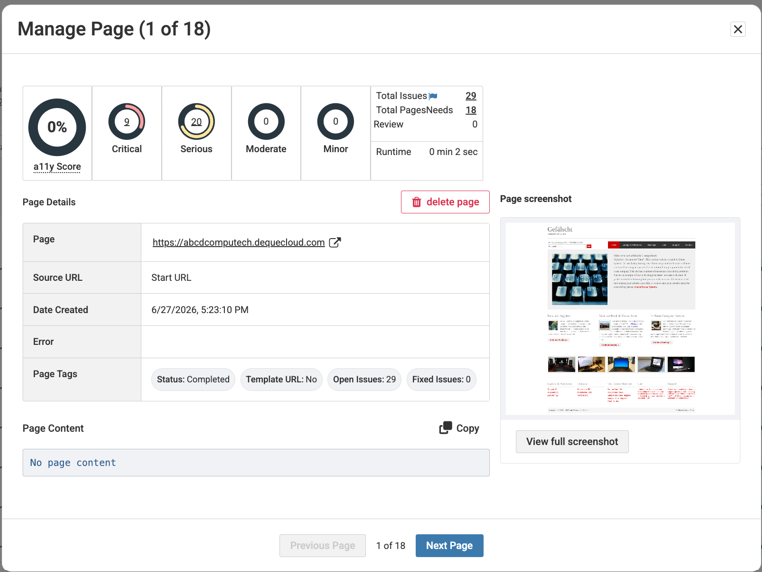
| Field Name | Description |
|---|---|
| Accessibility score | Each page receives an accessibility score based on the issues and impact of the issues for that page. |
| Issue Breakdown | Issue counts for critical, serious, moderate, and minor issues. Select the number in each chart to view these issues. |
| Total Issues | The total number of issues on the page. Select the number to view the total number of issues on the Issues page. |
| Total Pages | The total number of pages in the scan. Select the number to view a list of these pages. |
| Needs Review | The results on the page are marked as needs review. Select the number to view these results. |
| Runtime | The amount of time it took axe Monitor to scan the page. |
| Delete Page | Select the delete icon to delete the page. |
| Page | Select the link to open the page in a new tab. |
| Source URL | Select the link to open the source URL of the page in a new tab. |
| Date Created | The date the page was first scanned. |
| Error | Any errors found while scanning the page. |
| Page Tags | Status, Template URL (Common Components), Open issue count, and Fixed issue count. |
| Page Content | The page's source code is only saved if the scan setting to save page content is turned on. Use the copy button to copy the element source code. |
| Page screenshot | Displays a preview of the PDF page captured during the scan. Select View Full Screenshot to open the full-page screenshot for review. Note: Screenshots are only available when this setting is turned on for the scan. |
Use the Previous Page and Next Page buttons to navigate between pages. Close the Manage Page dialog box to go back to the Pages view.