
What's New for Release 2.33
Access the Knowledge Base here.
Sign Up to receive the latest updates on Axe Auditor in an email.
Bug Fixes - 2.33.1
- Create test cases without a default folder. You no longer need a default folder in place to create a new test case; test cases can be created directly, even when no folder exists.
- Resolved intermittent 502 (Bad Gateway) errors. Some users encountered occasional 502 errors during use. We've improved how connections are maintained, so these interruptions no longer occur.
- Correct checkpoint mapping on issue import. When importing WCAG issues from the axe DevTools extension, one checkpoint was occasionally imported against the Trusted Tester standard instead of WCAG. Imported issues now map to the correct WCAG checkpoints.
- Automated screenshots restored. Some customers experienced automated screenshot failures after an upgrade due to a script issue. This has been resolved, and automated screenshots now work as expected.
Performance and Reliability - 2.33.1
- Improved capacity under load. The platform now handles more simultaneous requests during periods of high usage.
- Traffic protection during unusual load. To keep the service stable and responsive for all users, we now apply rate limiting to certain requests during abnormal traffic spikes. Typical usage is unaffected.
What's New for Release 2.33
JIRA Integration
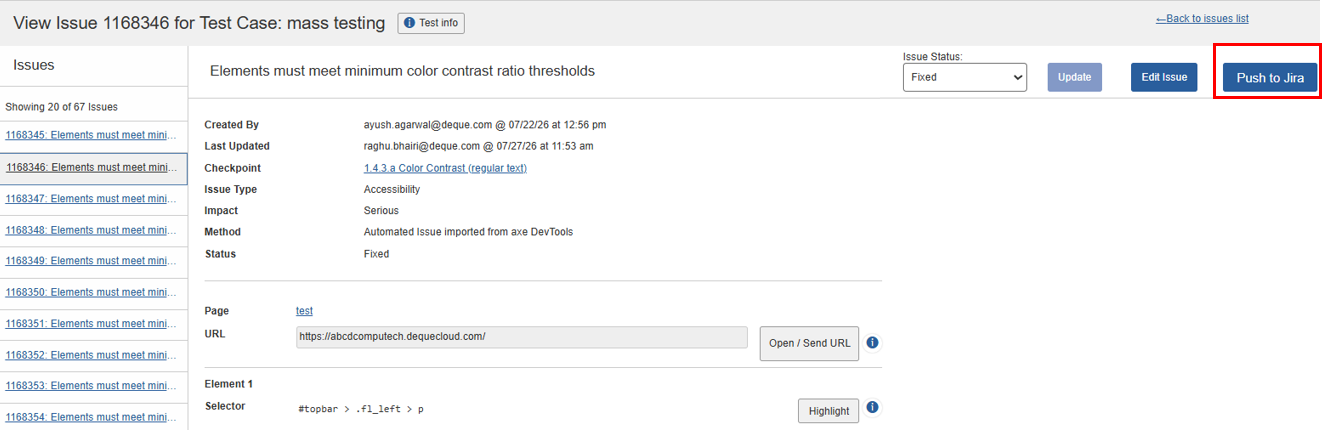
Push accessibility issues from Axe Auditor directly into Jira, no more recreating them manually. Push a single issue or a batch, and track their status without leaving your workflow.
Once an Axe Account administrator configures a Jira connection and an issue template, testers and reviewers can push confirmed issues straight from Axe Auditor.
What you can do:
-
Push a single issue from the View Issue page once the test run is complete.
-
Push multiple issues from the Issues list — select the issues and choose Push to Jira from the Actions menu.
-
Choose the Jira connection and issue template at push time, so you can route issues to different Jira projects or field mappings.
Track each pushed issue:
- Status shows the current Jira status.
- View in Jira opens the corresponding Jira issue.
- Push History displays the Jira issue key, the user who pushed it, and the date and time of the push.
- Review a bulk-push summary showing how many issues were pushed successfully, skipped (already pushed), or failed.
- Avoid duplicates: once an issue is pushed successfully, Push to Jira is disabled for that issue.
Before you begin (administrator setup)
- Configure at least one Jira connection for your organization.
- Create at least one issue template that maps Axe Auditor fields.
Tip: Before a bulk push, confirm your issue template's field mappings are compatible with the target Jira project. For example, avoid mapping text into a numeric field, and keep summaries within Jira's character limit.
Who it's for
- Administrators: configure connections and create templates.
- Testers and reviewers: push issues and track status and push history without leaving Axe Auditor.
Prerequisites
- You must have an active Jira Cloud subscription in Axe Account.
- At least one Jira connection must be configured for your Axe Account.
Why it Matters
The Jira integration removes manual re-entry, cuts duplicate work, and keeps remediation status synchronized between Axe Auditor and Jira, whether you're moving a single issue or a full backlog.
To learn more about the Axe Auditor Jira Integration →
Note: The Jira integration feature is not yet availabe for assessment users.
Import “Needs Review” Issues
You can now import, track, and validate accessibility issues that automated testing can't confirm, directly inside your test run, alongside your confirmed findings.
Previously, Axe Auditor filtered these out: issues flagged as Needs Review were excluded during import, moved to the Non-Imported Issues list (reason: Best practice / experimental / needs review), and were not stored, displayed, or tracked. Teams had no way to review or validate them in the application.
What you can do:
-
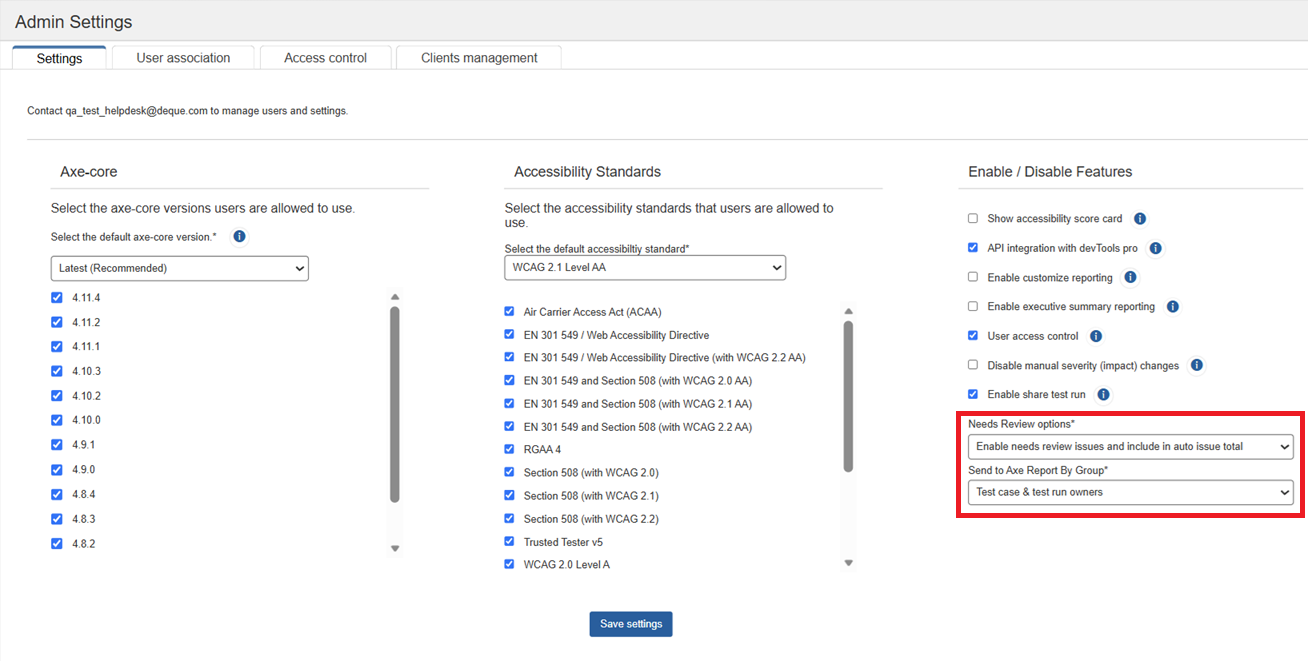
Choose how Needs Review issues are imported:
- Import and count: import them and include them in the automatic issue total.
- Import only: import them but exclude them from the automatic issue total.
- Don't import (default): skip them during import.
-
Import Needs Review issues together with standard automated and manual findings, so everything lives in a single test run.
-
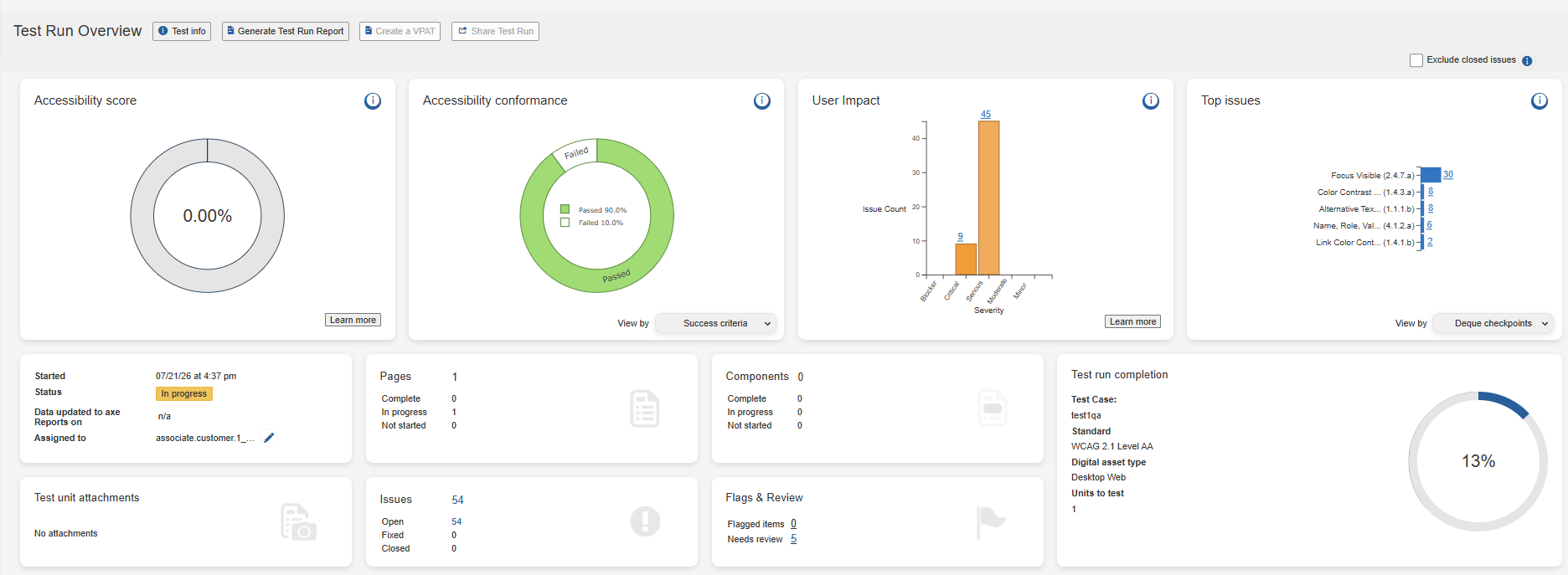
See the Needs Review count on the Flags & Review card on the Test Run Overview page.
-
Evaluate flagged issues before deciding whether they represent valid accessibility issues.
-
Confirm validated issues to include them with your confirmed findings, or dismiss the ones that do not apply.
Who this is for
- Administrators: enable Needs Review and decide whether flagged issues count toward the automatic issue total.
- Testers and reviewers: import, review, and confirm or dismiss flagged issues.
Why it matters
Automated scanning routinely surface issues that need a human to verify. Keeping them inside the test run means teams no longer track them in spreadsheets or risk losing sight of them, and administrators keep control over whether they count toward automatic totals before they are validated.
Mark Checkpoints as Not Applicable
Axe Auditor can now record checkpoints with no assigned result as Not Applicable (N/A) instead of Pass when a user selects Mark All Complete. This supports accessibility methodologies that distinguish N/A from Pass.
This is an install-level configuration that can be enabled during the upgrade to 2.33.0.
Known Issues
- When a user pushes an issue to Jira using a template that contains incompatible field mappings (for example, mapping text to a numeric field or mapping a summary that exceeds the Jira field's character limit), the push fails without displaying a validation or error message that identifies the mismatch.
- When a user copies an issue and changes the screenshot name in the copied issue, the screenshot name in the original issue is also incorrectly updated.
- The filter function fails to work on the Checkpoint tab for flagged issues.
- Performing automated testing on a component inside an iframe triggers an error and displays a persistent loading icon.
- The Accessibility Conformance chart fails to generate results for test runs using the ACAA testing standard and Mobile Web as the digital asset type.
- On the Issues list page, when users apply the Status filter as Open and the Groups filter as No Group, sorting the list by the Checkpoint column displays no records.
Infrastructure Upgrade
-
Deque Way version has been upgraded to 4.0.0
-
The Axe-core version has been upgraded to 4.12.1
Browser and Driver Support
The following table describes the minimum and recommended versions on which Axe Auditor is actively tested and best supported.
| Browser | Min Version | Recommended Version | Long Support Channel |
|---|---|---|---|
| Chrome | 144 | 150.0.x | Extended Stable (Win/Mac) |
| Firefox | 140 | 153.0.x | ESR |
| Safari | 18 | 26.4 | |
| Edge | 144.0 | 151.0.x | Extended Stable (Win/Mac) |
Automated Testing: Supported Browser and Driver
The following table describes the supported browsers, the minimum and recommended versions to perform automated testing in Axe Auditor.
| Browser | Min Version | Recommended Version | Long Support Channel |
|---|---|---|---|
| Chrome | 144 | 150.0.x | Extended Stable (Win/Mac) |
| Firefox | 140 | 153.0.x | ESR |