
AI Credits
Overview
AI credits are the currency used to access premium AI-powered features across the Axe DevTools platform. Credits provide a predictable way to manage and control your organization's usage of advanced accessibility testing capabilities powered by artificial intelligence.
Each enterprise (or single license holder) with an Axe DevTools Extension and/or Axe DevTools for Web subscription receives a monthly allocation of AI credits that automatically resets at the beginning of each billing cycle. For multi-user enterprises, credits are managed at the enterprise level, allowing any team member with access to share from a common pool.
How AI Credits Work
Credit Allocation
- Monthly Reset: Your credit allocation automatically renews at the start of each billing cycle (based on your subscription start date)
- No Rollover: Unused credits do not carry over to the next month
- Enterprise-Wide Pool: All users within your enterprise share the same credit pool
- Scales with Seats: Your total monthly credit allocation is based on the number of user seats (of Axe DevTools Extension (Pro) and/or Axe DevTools for Web) in your organization. More seats means more credits for your team to share
Credit Consumption
Credits are consumed when you use premium AI-powered features. The system tracks your usage in real-time, deducting credits as features are used:
- Real-Time Tracking: Your credit balance updates immediately after each AI operation
- Operation-Based Charging: Credits are deducted when AI features are completed
- Overage Protection: Operations in progress will complete even if they exceed your remaining balance, but your balance will not go below zero. See how these features work when credits run out.
Managing Your AI Credits
For Administrators
As an enterprise administrator, you have visibility and control over your organization's AI credit usage.
Monitoring Credit Usage
You can monitor your organization's credit consumption through the Axe Account Portal:
- Navigate to your billing page
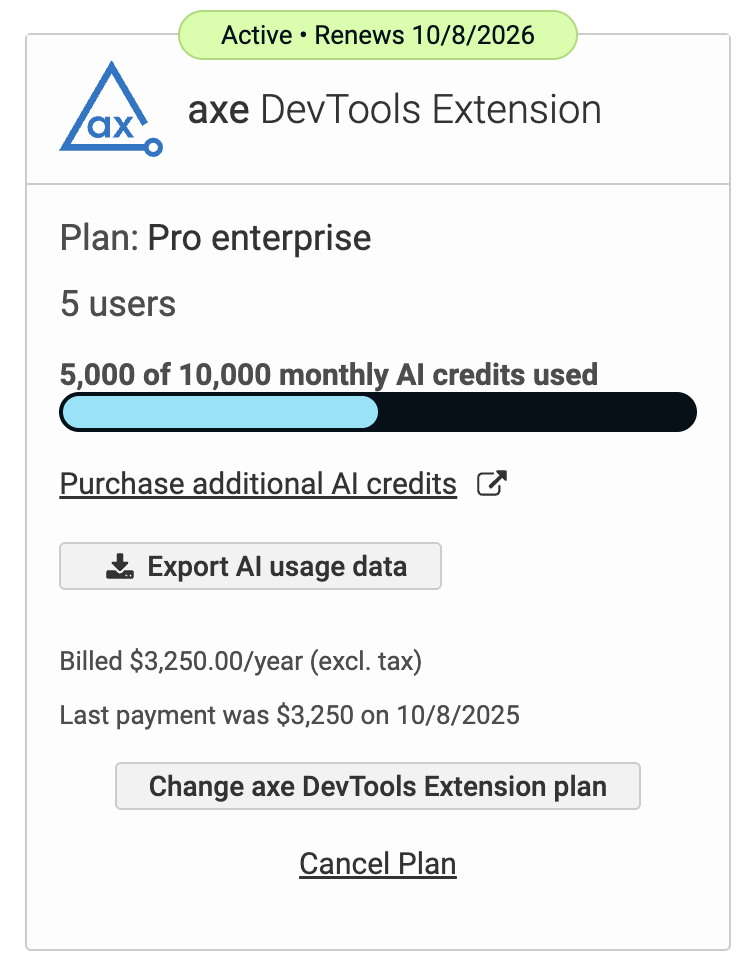
- View current credit balance and usage history in the subscription card
- See credit consumption broken down by subscription and user in a downloadable CSV
- Check your monthly credit reset date
Credit Notifications
As an admin, you will receive a mid-cycle email if your organization has used over 50% of your AI credits. In addition, you will receive an email if your organization reaches their credit limit before the end of the monthly billing cycle.
Purchasing Additional Credits
Additional AI credits can be acquired by speaking with your Deque sales associate.
- In the Axe Account Portal, navigate to the BILLING page
- Click the Purchase additional AI credits link in the product card
- You will be taken to your sales associate's meeting booking page
- Choose an available date/time to set up a meeting to discuss purchasing additional AI credits
Additional credits are applied to your current month's balance immediately upon purchase. Purchased credits become part of your baseline allocation for all future months.
Example: If your organization has a seat-based allocation and purchases an additional 10,000 credit pack:
- Your current month's balance increases immediately by 10,000 credits (in addition to your seat-based allocation)
- All future months will include this additional 10,000 credits on top of your seat-based allocation
Viewing Breakdown of AI Credit Usage
On the BILLING page within the Axe Account Portal, you can click the Export AI usage data to download a CSV report of the AI credit usage over the past 60 days. This report includes a breakdown of:
- User Full Name
- User Email Address
- Subscription
- Action
- Date/Time
- AI Credits Used
When Credits Run Out
When your organization's credit allocation is exhausted:
Axe DevTools Extension
- Advanced Rules: Scans will continue using advanced rules without AI-enhanced detection
- AI-Assisted IGTs: The workflow automatically reverts to the traditional IGT process (element classification features remain available at no cost)
- Clear Messaging: You'll see in-product messages explaining that AI features are temporarily unavailable and when they'll be restored
Axe MCP Server
- Remediate Tool: The tool becomes unavailable until credits are replenished
- IGT Tool: The tool becomes unavailable until credits are replenished
- Analyze Tool: Does not consume AI credits and will continue to function
- Error Messages: Clear feedback indicates when credit limitations prevent AI operations
Credit Restoration
AI features automatically become available again when:
- Your administrator purchases additional credits for the current month
- Your monthly allocation resets at the next billing cycle
Features That Use AI Credits
Advanced Rules (Axe DevTools Extension, Axe MCP Server)
Advanced rules are automated rules that would otherwise require manual testing. Only a subset of the rules make use of AI and consume credits:
Advanced rules run in the Axe DevTools Browser Extension and in the Axe MCP Server's analyze tool. Credits are consumed the same way in both. See Advanced Rules for how the MCP Server resolves which preset to run.
Automated Intelligent Guided Testing (Axe DevTools Extension)
Automated IGTs bring automation to accessibility testing workflows that previously required manual assessment of each question. The AI analyzes your page, makes inferences, then presents its findings for your review. Because you can see the reasoning behind each decision, you can quickly validate results and make corrections where needed, completing comprehensive accessibility tests in a fraction of the time.
Learn more about Automated IGTs
AI Remediation Guidance (Axe MCP Server)
Generates specific, actionable code recommendations to fix accessibility issues that coding agents can translate into actual source code changes
AI Features at No Credit Cost
The following AI-powered capabilities are included with Pro or Axe DevTools for Web subscription at no additional credit cost:
IGT Element Classification
Automatic identification of element roles to help you complete Intelligent Guided Tests faster:
- Interactive Elements Detection: AI automatically identifies which elements on the page are interactive (buttons, links, form controls, etc.)
- Table Header Detection: AI recognizes table header cells to streamline table testing workflows
- Form Field and Label Pairing: AI identifies form fields and their associated labels
These classification features help you work more efficiently without consuming your credit allocation.
Frequently Asked Questions
How are credits calculated?
Credits are an abstraction of the actual costs associated with running AI models and services. Different AI operations require different amounts of computational resources, which is reflected in their credit costs. This also means, as our costs go down, those savings are forwarded to you!
How are credit allocations determined?
Your monthly credit allocation is calculated based on the number of user seats in your organization, plus any additional credits purchased. Each seat contributes to your total enterprise credit pool, which all users share. If you add or remove users from your organization, your total monthly credit allocation will adjust accordingly in the next billing cycle.
If you have subscriptions to both Axe DevTools for Web and Axe DevTools Extension (Pro), credits will be calculated from the total number of seats across both subscriptions in one single pool.
Are all AI features charged credits?
No. Some AI features are included at no credit cost, such as element classification for IGTs. Credit-worthy features include Advanced Rules, AI-Assisted IGT analysis, and AI remediation guidance.
Can I see exactly how many credits each operation uses?
Yes. Admins can view detailed usage reports showing credit consumption by feature, user, and time period.
What happens if I'm in the middle of an operation when credits run out?
Operations that are already in progress will complete successfully. However, your credit balance will not go below 0. New AI operations cannot be started until credits are replenished.
Do credits expire?
Yes. Unused credits expire at the end of each monthly billing cycle and do not roll over. However, any additional credits you purchase become part of your permanent baseline allocation.
Can credits be shared between different subscriptions?
If you have both Axe DevTools for Web and Axe DevTools Extension (Pro) all credits, including those from pro, will be tracked on the Axe DevTools for Web subscription.
Can I allocate different credit amounts to different teams or projects?
Credit allocation is currently managed at the enterprise level. All users within your enterprise with access to a given subscription share the same credit pool.
Getting Help
For questions about AI credits or to purchase additional credits:
- Contact Sales: Reach out to your Deque sales representative
- Email Support: helpdesk@deque.com