
Uploading Your Accessibility Results to Axe Developer Hub
Using Axe Developer Hub with the Ruby APIs
You can upload your accessibility results to Axe Developer Hub and use its features to track fixes to accessibility problems.
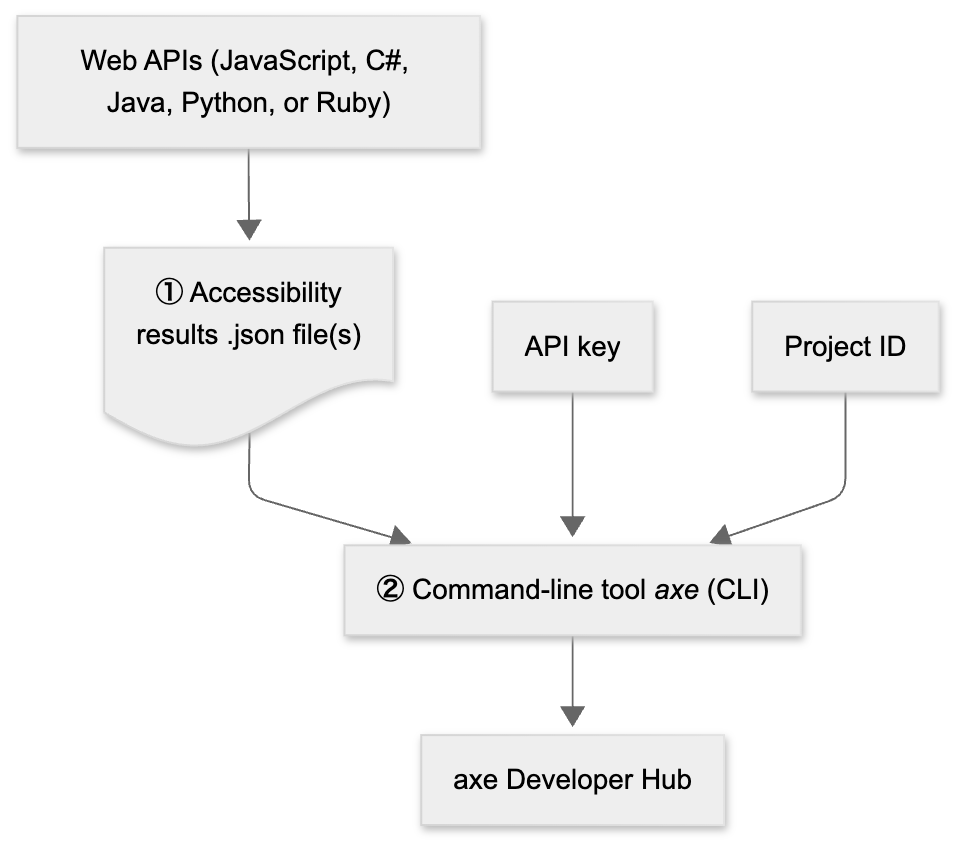
There are two steps to follow to upload your results from the web APIs to Axe Developer Hub, as shown in the following diagram:
-
Your test code writes results (a
.jsonfile containing your accessibility results) to disk. Modify your test code to create an accessibility results file. See Creating Accessibility Results below for more information about modifying your code. -
Use the CLI tool
axewith thedevhubsubcommand to upload your results to Axe Developer Hub by specifying the results file, your personal API key, and your project ID. For example:axe devhub <results.json> --axe-devhub-api-key <API-key> --axe-devhub-project-id <project-ID>
See Uploading to Axe Developer Hub for more information about using the CLI to upload results to Axe Developer Hub.
Creating Accessibility Results
For Ruby, you need to use either the axe-devtools-cucumber or axe-devtools-rspec gem to log results.
- Cucumber: see
logging results- Logging results clause - RSpec: see
logging_results- Logging results clause
To configure logging, see Configuring Reporting Options with Axe DevTools Configuration.