
Global Configuration
This article describes how the global configuration of Axe Configuration works with Axe Developer Hub
Overview of Global Configuration
The Global panel of Axe Configuration provides a centralized way to manage and control accessibility testing settings across your organization. This powerful feature allows enterprise administrators to establish consistent testing standards while giving individual teams and developers the flexibility they need to work effectively.
What is Global Configuration?
Global configuration (the Global tab of Axe Configuration) is a set of controls that determine how Axe Watcher operates during accessibility testing. These settings include:
- Which accessibility standards to test against (such as WCAG 2.1 AA or EN 301 549)
- Whether to include best practices checks
- Whether to enable experimental rules
- Which version of axe-core to use for testing
These settings can be managed at both the enterprise and individual user level, creating a flexible but controlled testing environment.
Why Use Global Configuration?
Global configuration solves several common challenges in enterprise accessibility testing:
- Consistency: Ensure all teams are testing against the same accessibility standards
- Compliance: Enforce specific testing requirements across your organization
- Flexibility: Allow teams to customize their testing approach within approved parameters
- Version Control: Manage which axe-core versions can be used across projects
- Quality Assurance: Maintain testing standards while enabling team-specific optimizations
How Global Configuration Works
Administrators
Administrators set organization-wide defaults and define which settings users can modify via the configurationOverrides property (JavaScript/TypeScript) or AxeWatcherOptions.setConfgurationOverrides() method (Java). These settings establish the baseline for Axe Watcher testing within the organization. These settings are changed in the Global panel of Axe Configuration.
Not all settings in the Global panel currently apply to Axe Developer Hub (or Axe Watcher). The settings that do apply include:
- Default Accessibility Standard
- Default axe-core Version
- Default Best Practices
- Default Experimental Rules
- Shared Report Access Control
Users
Individual users customize Axe Watcher by changing or adding the configurationOverrides option in their testing setup code to choose values different from what their organization administrator set up (but only for settings where the administrator checked the Allow users to change checkbox).
The configurationOverrides option interacts with the settings in the Global panel as defined in the table in Common Global Configuration and Configuration Override Scenarios.
The API references include more information about (JavaScript/TypeScript) configurationOverrides or (Java) ConfigurationsOverrides and its properties.
Common Global Configuration and Configuration Override Scenarios
When a test runs, Axe Developer Hub merges enterprise and user settings to create the final testing configuration. This ensures all customizations remain within approved parameters while giving users the necessary flexibility.
The following table illustrates common scenarios you'll encounter when working with global configurations. Each scenario shows how enterprise settings interact with your project configuration.
| Scenario | What You Want to Do | Global Configuration | Your Configuration Code | Result |
|---|---|---|---|---|
| Basic Usage | Use the default standard | WCAG 2.0 AA (unchangeable in global configuration) | No configuration specified | ✅ Tests run using WCAG 2.0 AA |
| Permitted Override | Use a different allowed standard | WCAG 2.0 AA, can use 2.1 AA | configurationOverrides: { accessibilityStandard: 'WCAG 2.1 AA'} |
✅ Tests run using WCAG 2.1 AA |
| Unauthorized Override | Use an unauthorized standard | WCAG 2.0 AA only | configurationOverrides: { accessibilityStandard: 'WCAG 2.1 AA' } |
❌ Error: Standard not permitted |
| Enable Best Practices | Include best practice checks | Best practices allowed | configurationOverrides: { bestPractices: true } |
✅ Tests include best practices |
| Mixed Configuration | Use custom rules with standard | WCAG 2.0 AA (unchangeable) | runOptions: { rules: { 'color-contrast': { enabled: false } } } |
⚠️ Works but displays warning |
| Legacy Configuration | Use old-style configuration | Any | runOptions: { runOnly: { type: 'tag', values: ['WCAG 2.0 A'] } } |
⚠️ Works but displays warning |
| Invalid Combination | Mix old and new configurations | Any | Using both configurationOverrides and runOptions.runOnly |
❌ Error: Cannot use both |
Use ancestry |
Need to use dynamic selectors | Any | Using both configurationOverrides and runOptions.ancestry = true |
✅ Works as long as runOptions.runOnly and runOptions.rules are not set. |
Understanding the Results
- ✅ Success: Configuration works as expected
- ⚠️ Warning: Configuration works but isn't recommended
- ❌ Error: Configuration will fail
Recommendations
- Always prefer
configurationOverridesoverrunOptions. - Check your enterprise settings before configuring overrides.
- Only override settings when necessary.
- Use the most straightforward configuration that meets your needs.
Example Configuration Override
Here's an example configuration that demonstrates overrides to follow WCAG 2.1 AA, set axe-core to version 4.9.1, and allow experimental rules and best practices:
const config = {
  axe: {
    apiKey: 'YOUR_API_KEY',
    projectId: 'YOUR_PROJECT_ID',

    configurationOverrides: {
      accessibilityStandard: 'WCAG 2.1 AA',
      axeCoreVersion: '4.9.1',
      experimentalRules: true,
      bestPractices: true
    }
};
See (JavaScript/TypeScript) ConfigurationOverrides Interface or (Java) ConfigurationOverrides Class for an explanation of the properties.
Errors and Warnings
Errors
Not-Permitted Standard
If you try to use a standard that is not permitted, you will receive a server response code 422, Unprocessable Content. Example message:
Error: Server responded to https://axe.deque.com/api-pub/watcher/sessions with status code 422: "error": "Invalid accessibility standard: WCAG 2.0 AA. Allowed options: EN 301 549, Trusted Tester v5"Using runOptions.runOnly with configurationOverrides
If you use both runOptions.runOnly with configurationOverrides, your tests will immediately fail.
Warnings
Using runOptions with runOnly or rules
If you set the runOnly or rules properties on the runOptions object, you will receive this message:
This scan was created using runOptions. This may not be aligned with your organization's global configurations.Using either runOnly or rules could allow your code to use accessibility rules that aren't allowed by the global configuration your organization uses.
If you use only the ancestry property (setting its value to true) with runOptions (without setting the rules or runOnly properties), you will not see this warning.
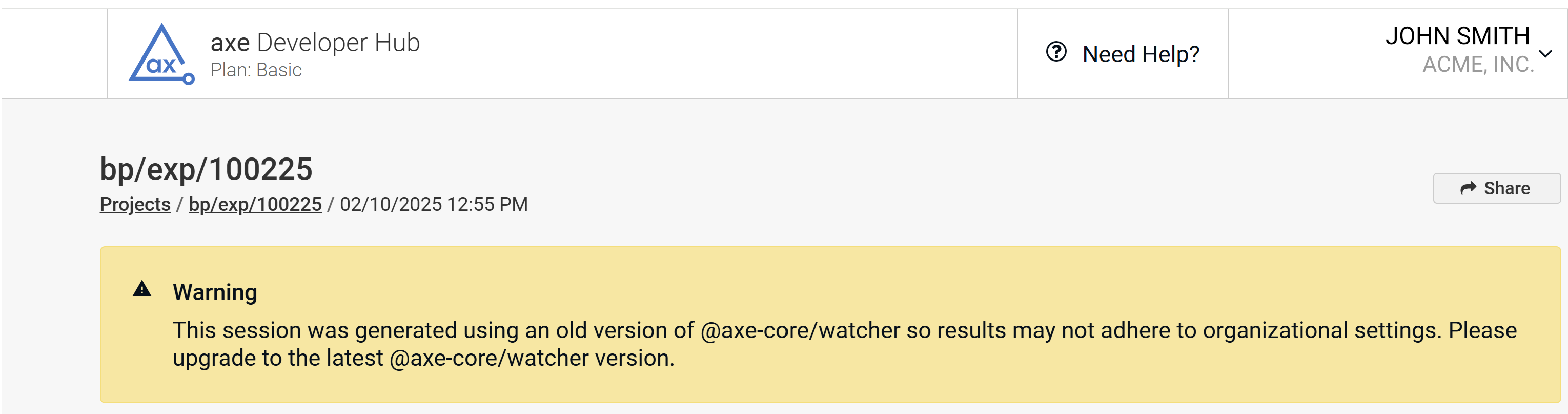
@axe-core/watcher Without Global Configuration Support
If you use a version of @axe-core/watcher that is too old to have global configuration support, you will receive this message:
See Also
- Axe Configuration
- (JavaScript/TypeScript)
configurationOverridesreference - (Java)
ConfigurationOverridesClass