
二要素認証の設定
axe Auditorへのアクセスに対して二要素認証を設定するのは、組織から要求された場合や、個人的に追加のセキュリティ層を欲しいと感じた場合です。有効化するには、スマートフォンにモバイルアプリをインストールし、そのアプリにコードを入力(またはスキャン)し、それにより生成されるコードをaxe Auditorに入力するだけです。その後、axe Auditorにサインインする際には、デスクトップアプリケーションへのアクセスを完了するために、モバイルジェネレーターから新しいコードを入力する必要があります。
始める前に、まずaxe Auditorにサインインし、Authenticator画面に移動してください。詳細については、", "context": "paragraph サインイン", "context": "link text および", "context": "paragraph Authenticator", "context": "link textを参照してください。", "context": "paragraph
二要素認証を設定する", "context": "strong textには、次の手順を実行してください。", "context": "paragraph
- Google Playストア(Android用)などのアプリストアから、モバイルデバイスにFree OTP Authenticatorアプリをインストールします。", "context": "paragraph
- アプリが要求するカメラ、写真/メディア/ファイルへのアクセスを許可します。", "context": "paragraph
- ダウンロードとインストール後、FreeOTP(またはGoogle Authenticator)アプリを開きます。", "context": "paragraph
- トップツールバーから", "context": "paragraph QRコード", "context": "strong text アイコン(または", "context": "paragraph キー", "context": "strong text アイコン)ボタンをクリックします(Free OTPの例)。", "context": "paragraph
- モバイルデバイスのカメラをaxe Auditor Authenticator画面の四角いQRコードに向けてスキャン完了するまで固定します(またはキーを入力します)。", "context": "paragraph
- axe Auditor Authenticator画面の", "context": "paragraph ワンタイムコード", "context": "strong text フィールドにコードを入力します。", "context": "paragraph
- 「", "context": "paragraph 保存", "context": "strong text 」ボタンをクリックします。", "context": "paragraph
- axe Auditorからサインアウトし、再度サインインします。完全な詳細については、", "context": "paragraph ログアウト", "context": "link text および", "context": "paragraph サインイン", "context": "link textを参照してください。", "context": "paragraph
- モバイルアプリからコードを取得し、", "context": "paragraph ワンタイムコード", "context": "strong text 入力フィールドボックスに入力し、「", "context": "paragraph ログイン", "context": "strong text 」ボタンをクリックします。", "context": "paragraph
設定済みの認証器の削除
設定済みの認証器を削除する場合は、Authenticator画面で「", "context": "paragraph 削除", "context": "strong text 」リンクをクリックします。", "context": "paragraph
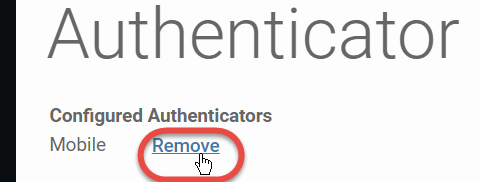 。",
"context": "paragraph
。",
"context": "paragraph
Authenticatorページの上部に緑色の背景で、削除が成功したことを知らせるシステム応答メッセージが表示されます。", "context": "paragraph
