
ImageViewの名前
画像は画面リーダーのユーザーにその目的を伝えるべきです


私たちが確認すること
フォーカス可能な画像要素は、TalkBackが画像に関する意味のある情報を伝えるために、アクセス可能な名前を持たなければなりません。情報を伝える画像には内容の説明が必要であり、純粋に装飾的な画像はまったくフォーカスを受けるべきではありません。
一目で分かる
- このルールはユーザーにとって重要な影響を持っています
- 情報を伝える画像には、その画像が伝えることを正確に説明する
contentDescriptionが必要です - 装飾的な画像は個別にフォーカスを受けるべきではありません — 支援技術から隠してください
- 「画像」や「アイコン」などの曖昧な説明を避け、画像の意味や目的を説明してください
- TalkBackは
contentDescriptionを読み上げます。それがないと、画像は画面リーダーのユーザーにとって無音です
失敗例 ❌
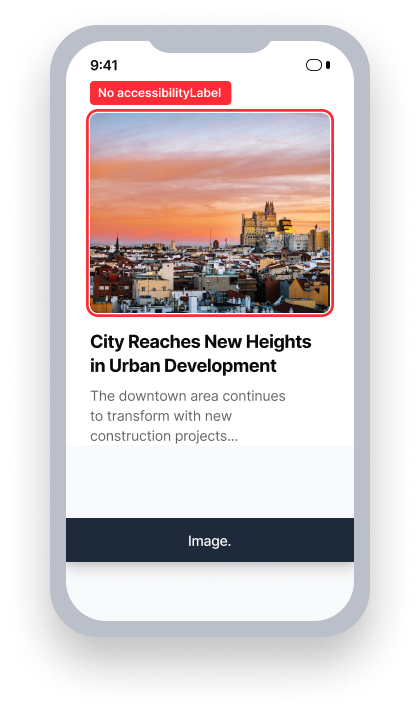
name = {none}
TalkBack は役割だけを発表します
「画像」
ユーザーは画像が伝える情報を受け取りません
合格例 ✅
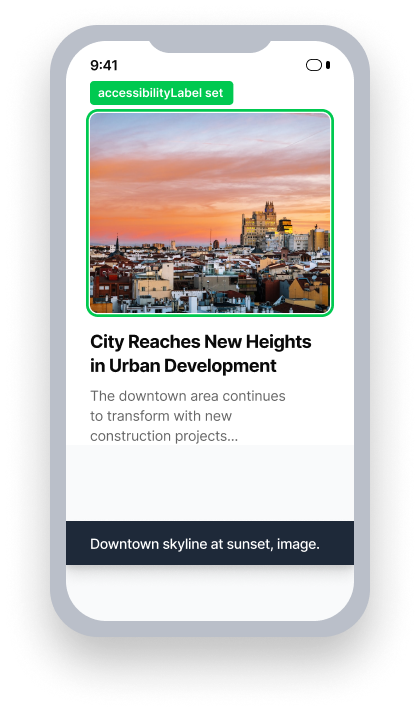
name = 「夕日の都市のスカイライン」
TalkBack を発表します the name and role
ユーザーは画像の内容について情報を受け取ります
ユーザーへの影響
TalkBackを利用している人々は、このルールによって発見された問題の影響を最も受けやすいです。ImageViewが視覚的に情報を伝えているがアクセス可能な名前を持たない場合、TalkBackは何も発表しません。画面リーダーに頼るユーザーは、その情報を完全に見逃すことになります。
誤ってフォーカスを受ける装飾的な画像は、ナビゲーション中に意味のないノイズを発生させ、破壊的な体験を引き起こす可能性があります。
情報を伝える画像は、contentDescriptionを使用してTalkBackを通じて必要なコンテキストと詳細を提供すべきです。
ImageView名の問題を確認
- TalkBackをオンにする
- 画像上で「探索するためにタッチする」ジェスチャーを行います
- 次のいずれかが起こります:
- 情報を提供する画像の場合:
- アクセス不可能: 要素はフォーカスを受けますが、TalkBackは意味のあることを何も発表せず、またはファイル名だけを発表します
- アクセス可能: フォーカスを受け、意味のある説明を発表します
- 装飾的な画像の場合:
- アクセス不可能: 画像が個別にフォーカスを受け、TalkBackは何も有用なことを発表しません
- アクセス可能: 個別にはフォーカスを受けない(グループ内でのフォーカスは可)
- 情報を提供する画像の場合:
問題を修正
ImageView名の問題を解決するためには、情報を伝える画像にcontentDescriptionを提供し、純粋に装飾的な画像からフォーカスを取り除いてください。説明は、視覚的に情報を得るユーザーが画像から得るものと同じ情報を伝えなければなりません。ベストプラクティスとして、画像の意味を文脈で説明し、視覚的な外見だけでなく、その意味を伝えてください。
XML
情報を伝える画像には、レイアウト内で直接contentDescriptionを設定します。
  <ImageView
      android:id="@+id/promo_banner"
      android:layout_width="wrap_content"
      android:layout_height="wrap_content"
      android:contentDescription="Promotional banner: Ask your travel agent about our latest deals!"
android:src="@drawable/promo_banner" />装飾的な画像には、TalkBackから隠すためにimportantForAccessibility="no"を設定します。
  <ImageView
      android:layout_width="wrap_content"
      android:layout_height="wrap_content"
      android:importantForAccessibility="no"
android:src="@drawable/background" />プログラムによる関連付けのためには、コードでsetContentDescriptionを使用します:
  ImageView image = findViewById(R.id.promo_banner);
  image.setContentDescription("Promotional banner: Ask your travel agent about our latest deals!");
Compose
情報を伝える画像には、Imageに説明的なcontentDescriptionを設定します。
  Image(
      painter = painterResource(id = R.drawable.promo_banner),
      contentDescription = "Promotional banner: Ask your travel agent about our latest deals!"
)装飾的な場合、TalkBackから隠すためにImageにnullとしてcontentDescriptionを設定します。
  Image(
      painter = painterResource(id = R.drawable.background),
      contentDescription = null
  )
ネイティブAndroid
情報を伝える画像には、その目的を説明するためのcontentDescriptionを設定します。
ImageView image = .......;
image.setContentDescription("Promotional banner: Ask your travel agent about our latest deals!");
React Native
React Nativeは多くの要素にアクセスビリティの役割を自動的に追加しません。支援技術で利用可能にしたいすべての画像にaccessibilityRole="image"を追加することを確認してください。Axe Accessibility Linter VSCode拡張機能とAxe DevTools Linterは、React Nativeサポートを含むようになり、UIテスト前にこのようなアクセシビリティ問題を捉える手助けをします。
ユーザーが必要とする情報を伝える画像である場合、accessible={true}としてマークし、accessibilityLabelに説明的な値を提供してください。
<Image
    ...
    accessible={true}
    accessibilityRole="image"
    accessibilityLabel="Promotional banner: Ask your travel agent about our latest deals!"
/>画像が装飾的であり、独自の情報を伝えない場合、accessible={false}としてマークし、フォーカス可能にならないようにしてください。
<Image
    ...
    accessible={false}
/>
.NET MAUI
.NET MAUIでは、内容記述が与えられていない画像は自動的にアクセシビリティにおいて重要でないとマークされます。これにより、意図せず装飾画像としてマークされた画像がaxe DevTools Mobileで通過することになります。情報やコンテキストを伝える画像には、適切な説明を確実に提供してください。
情報を伝える画像の場合、その情報を伝えるための説明的なSemanticProperties.Descriptionを設定してください。
<Image
    ...
    SemanticProperties.Description="Promotional banner: Ask your travel agent about our latest deals!"
/> または、その情報を伝えるためにImage要素の下にLabel要素を目に見える形で提供してください。
<StackLayout
    HorizontalOptions="FillAndExpand"
    VerticalOptions="StartAndExpand">
    <Image
        BindingContext="{x:Reference imageLabel}"
        SemanticProperties.Description="{Binding Path=Text}"
        ...
    />

    <Label
         x:Name="imageLabel"
         Text="Promotional banner: Ask your travel agent about our latest deals!"
         ...
    />
</StackLayout>
Flutter
意味のある画像はSemantics要素で囲み、image: trueと説明的なlabelを追加して、画面リーダーがその画像が伝えることを発表できるようにします。
  // Failing — image has no accessible name
  Semantics(
    image: true,
    child: Image.asset('assets/company_logo.png'),
  )

  // Passing — descriptive label provided
  Semantics(
    label: 'Deque company logo',
    image: true,
    child: Image.asset('assets/company_logo.png'),
  )
意味を伝えない装飾的な画像については、アクセシビリティツリーから完全に除外して、画面リーダーがそれをスキップするようにします:
ExcludeSemantics(
    child: Image.asset('assets/decorative_divider.png'),
)
このルールを無視してもいいですか?
ImageView Nameにはユーザーのための重大な影響があり、見つかったすべての問題を修正することを強くお勧めします。情報提供用の画像にアクセシブルな名前がない場合、TalkBackユーザーには完全に見えず、画像が伝える情報について何も得られません。本当に装飾的で独立したフォーカスを受けないことを確認した場合のみ、このルールを無視してください。ルールの無視についてもっと学びましょう。
リソース
Deque University コースページ
注: Deque University のリソースに完全にアクセスするには、購読が必要です。
その他のリソース
- Web Content Accessibility Guidelines (WCAG) 2.0, W3C 推奨
- WCAG 2.0 解説ドキュメント