
アクティブコントロール名


何を確認するか
インタラクティブな要素は、VoiceOverやVoice Controlのような支援技術で利用可能なアクセシブルな名前を持つべきです。
失敗例 ❌
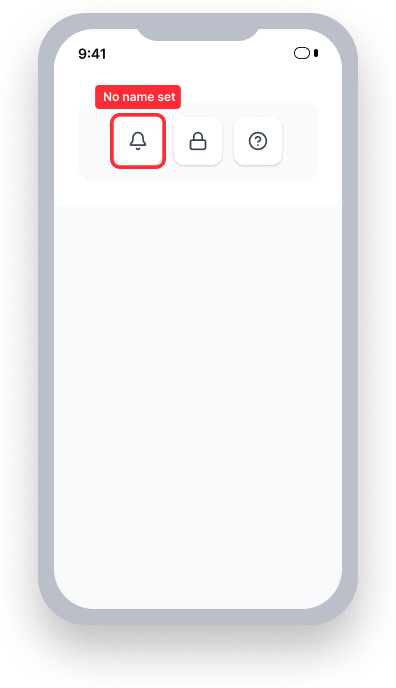
名前なし(accessibilityLabel)設定。
VoiceOver により、 "Button"
Voice Control — ユーザーが「通知」と話します。
名前がないため、要素は反応しません。
成功例 ✅
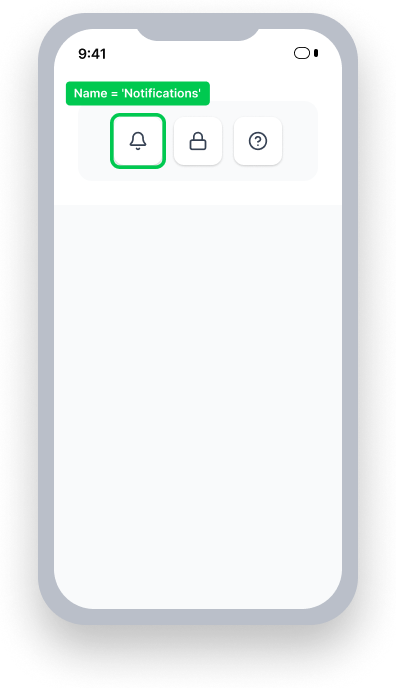
accessibilityLabel=
'Notifications'
VoiceOver により、 "Notifications, button"
Voice Control — ユーザーが「通知」と話します。
名前が一致するため、要素が有効化されます。
一目でわかる
- このルールはユーザーにとって重要な影響があります。
- すべてのインタラクティブな要素には名前が必要です:ボタン、リンク、入力すべてにVoiceOverで読み上げ可能な名前が必要です。
- インタラクティブな要素に目に見えるテキストがない場合は、それに意味のある名前を
accessibilityLabelを使って明示的に提供してください。 - VoiceOverが何も言うことがない状態にしないでください。名前なしでその役割や値だけを告げる要素は、ユーザーに何をするためのものなのか正確な文脈を提供しません。
- VoiceOverは何か(ボタンのテキストや画像名など)を読み上げようとしますので、正確かつ意図的な名前を提供することが最適です。
ユーザーへの影響
VoiceOverを使用している人々が最も影響を受けます。名前がないインタラクティブ要素では、相互作用する人に完全な文脈や目的が伝わりません。
ボタンやフォーム要素、カスタムコントロールのようなインタラクティブな要素にアクセシブルな名前がない場合、VoiceOverはその要素がフォーカスされたときにアナウンスすることがありません。例えば、ユーザーがダウンロードできることを示す下線付き矢印の画像を持つボタンがあるとします。アクセシブルな名前がないために、VoiceOverは「ボタン、ダブルタップで有効化」とだけアナウンスします。
このルールはVoice Controlを使用している人々にも影響を及ぼします。Visibleラベルを口に出して要素をアクティブ化しようとするVoice Controlユーザーは、それが反応しないことに気付くでしょう。
アクティブコントロール名の問題を確認
- VoiceOverをオンにする
- インタラクティブな要素にフォーカスする
- 次のいずれかが起こります。
- アクセス不可: 名前をアナウンスせず、存在する場合はその役割と値のみをアナウンスします。
- アクセシブル: VoiceOverで名前をアナウンスします。
予期しない失敗が発生していますか?要素にフォーカスした後にVoiceOverが内容をアナウンスしているのにこのルールが依然として失敗している場合、要素に名前を付与しているか確認してください。定義された名前が欠けている場合、その値はしばしばスクリーンリーダーによってアナウンスされます。しかし、値は欠けているアクセシブルな名前の代替にはなりません。
問題を修正
アクティブコントロールの問題を解決するには、すべてのインタラクティブな要素にアクセシビリティラベルを追加し、VoiceOverがアナウンスするための意味のある名前を持たせます。選択した名前が要素の目に見えるラベルを含むことを確認してください。
選択した名前が外見ではなく動作を説明することを確認します。虫眼鏡のアイコンは「虫眼鏡アイコン」ではなく「検索」としてラベル付けされるべきです。
要素の目的が状態に基づいて変わる場合(例: 再生/一時停止ボタン)、状態が変わるたびに名前を更新します。
UIKit
このルールで見つかった問題を修正するには、コントロールにaccessibilityLabelを追加します。
button.accessibilityLabel = "Deque Systems Website"SwiftUI
要素のテキストが有意義であることを確認するか、より多くの文脈が必要な場合はaccessibilityLabelを提供してください。
使用例: ラベルに画像を持つボタン
画像に意味のある名前があることを確認してください。複数の言語をサポートする場合にはこれはオプションではありません。名前が実行不可能な場合、画像にaccessibilityLabelを設定してください。
あるいは、親要素(例: ジェネリックなラッパー)とその子(例: テキストとボタン)を組み合わせて1つの要素にします。意味のあるテキストがない場合、以下に示すようにビュー全体にaccessibilityLabelを設定してください。
var body: some View {
    HStack(alignment: .center, spacing: 10,
           content: {
        Text("axe DevTools for iOS")
        Spacer()
        Button(action: { openLink() },
               label: {
            Image(systemName: "arrow.up.forward.app")
                .accessibilityHidden(true)
                .frame(minWidth: 50, minHeight: 50)
        })
        .accessibility(removeTraits: .isStaticText)
        .accessibility(removeTraits: .isButton)
        .accessibility(addTraits: .isLink)
    }).padding(16)
        .accessibilityElement(children: .combine)
        // .accessibilityLabel("Axe DevTools for iOS") <-- Add when `Text` is missing to ensure a name is present
}
React Native
このルールで見つかった問題を修正するには、インタラクティブな要素にaccessibilityLabelを追加します。
<TextInput
  ...
  accessibilityLabel="First Name"
/>要素がコンテナ内でViewにグループ化されている場合、accessibleとaccessibilityLabelプロパティを追加します:
<View
   importantForAccessibility='no-hide-descendants'
   accessible={true}
   accessibilityElementsHidden={false}
   accessibilityLabel={"Dark Mode"}
   accessibilityValue={{ text: "" + isEnabled }}
   accessibilityRole='switch'
   onPress={() => {
      setIsEnabled(!isEnabled)
    }}
 >
    <Switch
      trackColor={{ false: 'lightgray', true: 'dimgray' }}
      ios_backgroundColor={'lightgray'}
      thumbColor={'white'}
      onValueChange={ () => {
         setIsEnabled(!isEnabled)
      }}
      value={isEnabled}
      accessibilityElementsHidden={true}
     />
</View>
Flutter
IconButtonにtooltipプロパティを使用してアクセシブルな名前を提供します。これにより、VoiceOverがアナウンスする名前が設定されます。
  IconButton(
    icon: const Icon(Icons.search),
    tooltip: 'Search',
    onPressed: () {},
)目に見えるラベルとインタラクティブな要素をグループ化する際には、MergeSemanticsで包み込んで、VoiceOverがそれらを1つのフォーカス可能な要素として結合するようにします:
  MergeSemantics(
    child: Row(
      children: [
        const Text("Dark mode"),
        Switch(
          value: _darkMode,
          onChanged: (value) => setState(() => _darkMode = value),
        ),
      ],
    ),
  )
このルールを無視してもよいですか?
このルールはユーザーにとって重要な影響があり、無視すべきではありません。名前がないインタラクティブ要素は最も基本的なアクセシビリティ障害の1つです。VoiceOverとVoice Controlのユーザーは、アクセシブルな名前がない要素を使うのに苦労します。この問題のすべてのインスタンスを修正してから、優先度の低い問題に対処してください。
よくある質問
VoiceOverを使用しているときに、要素にフォーカスした後に内容が読み上げられます。なぜこのルールはまだ失敗しているのでしょうか? 要素に定義された名前がない場合、スクリーンリーダーはしばしばその値をアナウンスします。ただし、値は不足しているアクセシブルな名前の代替とはなりません。 特にボタン内の画像の場合、VoiceOverは画像のファイル名をアナウンスするかもしれません。ファイル名が説明的であっても、それは不足しているアクセシブルな名前属性の代替にはなりません。
リソース
Deque University コースページ
-
ネイティブモバイルiOSについては、4.1.2a 名前、役割、値 (A)をご覧ください
注: Deque Universityのリソースにフルアクセスするには、サブスクリプションが必要です。
その他のリソース
- ウェブコンテンツ・アクセシビリティ・ガイドライン (WCAG) 2.1
- SC 4.1.2を理解する, 名前、役割、値 (レベルA)