
ImageView 名称
スクリーンリーダーユーザーが画像から情報を得られるようにする


我々の確認項目
フォーカス可能な画像要素にはアクセシブルネームが必要です。これにより、VoiceOverが画像に関する意味のある情報をアナウンスできます。情報を伝える画像にはアクセシビリティラベルが必要です。純粋に装飾的な画像は全くフォーカスされるべきではありません。
一目でわかるポイント
- このルールはユーザーにとって重大な影響を持ちます
- 情報を伝える画像には、画像が伝える内容を正確に説明する
accessibilityLabelが必要です - 装飾的な画像はフォーカスを受けないようにし、支援技術から隠します
- 「画像」や「アイコン」のような曖昧な説明は避け、画像の意味や目的を説明します
- VoiceOverは
accessibilityLabelを音声で読み上げます。それがない場合、スクリーンリーダーユーザーにとって画像は無音になります
失敗例 ❌
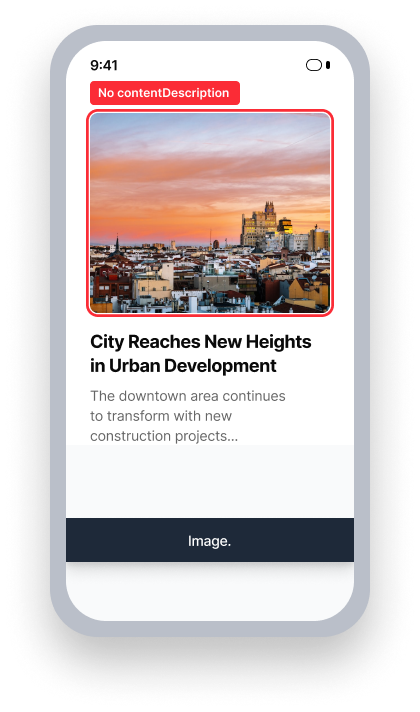
name = {なし}
VoiceOver は役割のみをアナウンスします
「画像」
ユーザーは画像が伝える情報を受け取れません
成功例 ✅
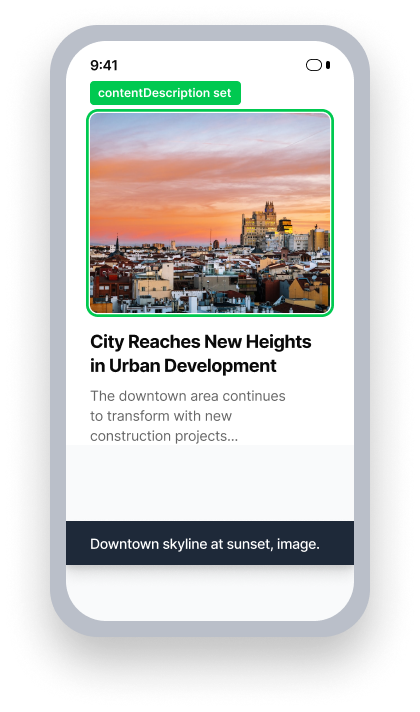
name = 「日没時のダウンタウンのスカイライン」
VoiceOver はアナウンスします the name and role
ユーザーは画像の内容について情報を得ます
ユーザーへの影響
このルールによって見つかった問題は、VoiceOverを使用している人々に最も影響を与えます。画像が視覚的に情報を伝えているがアクセシブルネームがない場合、VoiceOverは何もアナウンスしません。スクリーンリーダーに依存しているユーザーはその情報をまったく見逃してしまいます。
誤ってフォーカスを受ける装飾的な画像は、ナビゲーション中に無意味なノイズを発生させ、妨害的な体験を生み出すことがあります。
情報を伝える画像は、VoiceOverを通じて必要なコンテキストや詳細を提供するaccessibilityLabelを使用するべきです。
ImageViewの名前の問題を確認
- VoiceOverをオンにする
- 画像に移動するには右にスワイプするか、画面を指でドラッグしてタッチで探索します
- 次のうちいずれかが発生します:
- 情報を伝える画像の場合:
- アクセス不可: 要素はフォーカスを受けるが、VoiceOverは何も意味のあることをアナウンスせず、ファイル名のみをアナウンスします
- アクセス可能: フォーカスを受けて意味のある説明をアナウンスします
- 装飾的な画像の場合:
- アクセス不可: 画像は個別にフォーカスを受け、VoiceOverは何も有用なことをアナウンスしません
- アクセス可能: 個別にフォーカスを受けない(グループ内でのフォーカスは許可)
- 情報を伝える画像の場合:
問題を修正
ImageViewの名前の問題を解決するには、情報を伝える画像にaccessibilityLabelを提供し、純粋に装飾的な画像からはフォーカスを外します。説明は視覚ユーザーが画像から得る情報と同じ情報を伝えるべきです。ベストプラクティスとして、画像の見た目だけでなく、文脈内での意味を説明してください。
UIKit
このルールで発見される問題の原因は、accessibilityLabelを使用しないか、画像を誤ってアクセシビリティ要素としてマークすることです。
Storyboardで:
- 画像に移動する
- インスペクターパネルが表示されていることを確認する
- Identity Inspectorを選択する
- 画像がユーザーに必要な情報を提供する場合は、"アクセシビリティ" の下で "ラベル" テキスト フィールドにその情報を記入します
- 画像がユーザーに必要な情報を提供しない場合は、"アクセシビリティ" の下で "有効" チェックボックスの選択を解除します
コードで:
画像がユーザーに必要な情報を伝える場合、それを伝えるために説明的なaccessibilityLabelを記載してください。
image.accessibilityLabel = "Promotional banner: Ask your travel agent about our latest deals!"意味を伝えない装飾的な画像にはisAccessibilityElementを 「false」としてマークし、フォーカスされないようにします。
image.isAccessibilityElement = falseUIKitアプリでは、デフォルトでaccessibilityLabelがない画像は支援技術によってフォーカスされません。
accessibilityIdentifierが画像に設定されると、Appleからのフォーカス可能性を確認するために使用するプロパティは不正確になることがあります。この予期しない動作のため、UIKitアプリでのImageView Nameの問題の結果は「レビューが必要」として報告されます。Apple にバグ レポートが提出されています。
SwiftUI
画像がユーザーに必要な情報を伝える場合、画像に.accessibility(label: Text("<meaningful description>"))を設定します。あるいは、ラベルパラメータを含むImageイニシャライザを使用してください。
Image("format_info", label: Text("Promotional banner: Ask your travel agent about our latest deals!"))画像がユーザーに必要な情報を伝えない場合、装飾的または背景である場合は、支援技術から隠します。
Image("background_blue")
    .accessibility(hidden: true)
React Native
React Nativeは多くの要素にアクセシビリティの役割を自動的に追加しません。支援技術に利用したいすべての画像にaccessibilityRole="image"を追加してください。Axe Accessibility Linter VSCode ExtensionとAxe DevTools Linterは今ではReact Nativeをサポートしており、これらのようなアクセシビリティ問題をUIテスト前に見つけるのに役立ちます。
画像がユーザーに必要な情報を伝える場合、accessible={true}としてマークし、accessibilityLabelに説明的な値を提供します。
<Image
    ...
    accessible={true}
    accessibilityRole="image"
    accessibilityLabel="Promotional banner: Ask your travel agent about our latest deals!"
/>意味を伝えない装飾的な画像にはaccessible={false}を指定し、フォーカスされないようにします。
<Image
    ...
    accessible={false}
/>
.NET MAUI
.NET MAUIでは、コンテンツ記述のない画像は自動的にアクセシビリティ上重要でないとマークされます。つまり、意図的に説明をつけていない画像は装飾画像としてaxe DevTools Mobileで合格となりますが、装飾画像として意図されていない場合があります。情報やコンテキストを伝えるすべての画像に適切な説明が提供されていることを確認してください。
画像がユーザーに情報を提供する場合、その情報を伝えるために説明的なSemanticProperties.Descriptionを設定してください。
<Image
    ...
    SemanticProperties.Description="Promotional banner: Ask your travel agent about our latest deals!"
/> 代わりに、その情報を伝えるためにImage要素の下に可視のLabel要素を提供してください。
<StackLayout
    HorizontalOptions="FillAndExpand"
    VerticalOptions="StartAndExpand">
    <Image
        BindingContext="{x:Reference imageLabel}"
        SemanticProperties.Description="{Binding Path=Text}"
        ...
    />

    <Label
         x:Name="imageLabel"
         Text="Promotional banner: Ask your travel agent about our latest deals!"
         ...
    />
</StackLayout>
Flutter
意味のある画像にはSemantics要素でimage: trueと説明的なlabelを含め、スクリーンリーダーが画像の伝える内容を読み上げられるようにしてください。
  // Failing — image has no accessible name
  Semantics(
    image: true,
    child: Image.asset('assets/company_logo.png'),
  )

  // Passing — descriptive label provided
  Semantics(
    label: 'Deque company logo',
    image: true,
    child: Image.asset('assets/company_logo.png'),
  )
意味を伝えない装飾的な画像については、スクリーンリーダーがそれをスキップするようにアクセシビリティツリーから完全に除外してください。
ExcludeSemantics(
    child: Image.asset('assets/decorative_divider.png'),
)
このルールを無視してもいいですか?
ImageView Nameにはユーザー向けの重大な影響があり、発見されたすべての問題を解消することを強くお勧めします。アクセシブル名のない情報的な画像は、VoiceOverユーザーにとって完全に見えなくなり、その画像が伝える内容についての情報を受け取ることはありません。本当に装飾的で、独立したフォーカスを受けないことを確認した場合にのみ、このルールを無視してください。ルールの無視について詳しく学ぶ。
リソース
Deque University コースページ
注意:Deque University のリソースにフルアクセスするには、サブスクリプションが必要です。
その他のリソース
- Web Content Accessibility Guidelines (WCAG) 2.0, W3C 勧告
- WCAG 2.0 理解文書