
ネストされたフォーカス可能な要素
子要素をフォーカス可能にして、クリック可能な親からフォーカスを奪わないように


チェック項目
フォーカス可能な要素をクリック可能な親要素内にネストしてはいけません。非インタラクティブな子要素がフォーカス可能であると、支援技術はそれにフォーカスし、クリック可能な親がもつインタラクティブな役割が通知されません。
このルールは、インタラクティブではないアクセシビリティフォーカス可能なコントロールをすべてチェックします。このようなコントロールがクリック可能な親に含まれている場合、それは本質的にはインタラクティブですが、役割は通知されません。この要素はアクセシビリティ違反として指摘されます。
失敗例 ❌
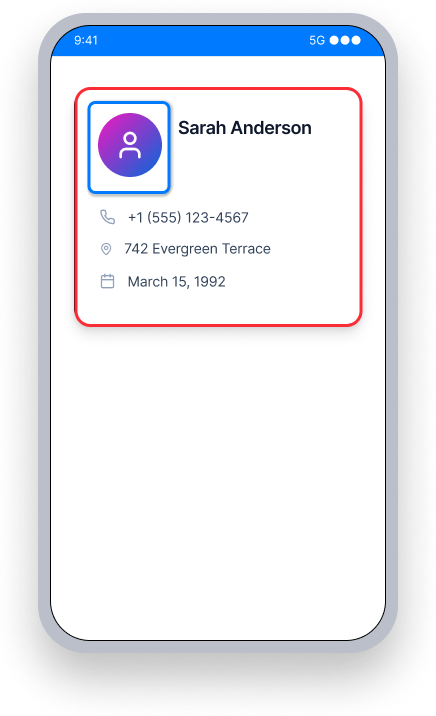
カードはクリック可能ですが、中のプロフィール写真は別にフォーカス可能です。
TalkBack カードの役割や「ダブルタップで有効化」というヒントを通知せず、代わりに内側の要素にフォーカスし、それを通知します。
ユーザーはカードがインタラクティブであることを知らず、フォーカスされた要素はクリックできません。
成功例 ✅
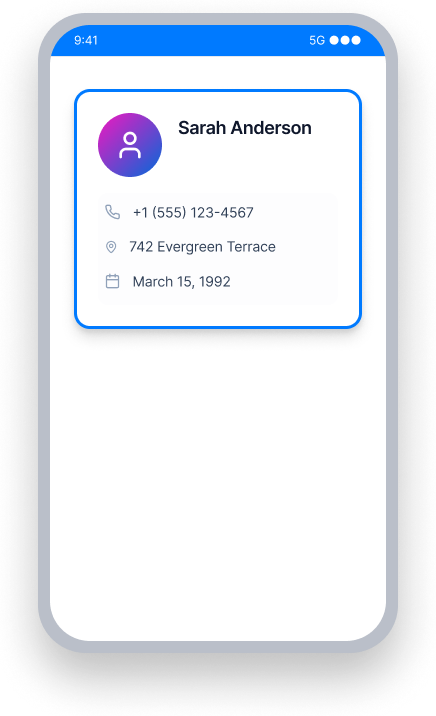
内側の要素はもう別にフォーカス可能ではありません。
TalkBack カード自体にフォーカスし、内容、役割、および「ダブルタップで有効化」を通知します。
ユーザーはカードがインタラクティブであり、アクティベートできることを理解します。
概要
- このルールは、TalkBackやVoice Accessのユーザーにとって重要な影響があります
- 子要素がクリック可能な親からフォーカスを奪うと、インタラクティブな役割が失われます
- フォーカスされた要素が自体でクリック可能でない場合、TalkBackは「ダブルタップで有効化」を通知しません
- 対策は常に、ネストされた要素からフォーカスを取り除くことであって、役割を追加することではありません
- アクションのないコンテナビューはクリック可能にしてはいけません—これにより誤検出を回避します
ユーザーへの影響
支援技術が役割を通知しない場合、TalkBackを使用する視覚障がいのあるユーザーはアクションをトリガーできることを知らずにいます。例えば、TalkBackは内側の要素にフォーカスし、そのテキスト(例:「テーマ」)のみを通知します。それがボタンであることや、ユーザーがダブルタップするべきだということは通知されません。ユーザーはスクリーン上での操作のための必要なコンテキストを得られません。
ネストされたフォーカス可能な要素の問題を確認
- TalkBackを起動
- 要素とそのすべての子孫にフォーカスを移動
- 次のいずれかが発生します。
- アクセス不可: TalkBackはテキストを読み上げますが、役割やインタラクションの方法を通知しません
- アクセス可能: TalkBackはすべてのテキストを読み上げ、さらに役割や要素とのインタラクション方法を通知します
問題解決
ネストされた要素からフォーカスを除去し、クリック可能な親がフォーカスを得てその役割を通知できるようにします。クリック可能なビューの非インタラクティブな子孫にフォーカス可能属性を追加しないでください。
誤検出を避けるため、タップして何もしないコンテナ要素がクリック可能なままにならないようにします。私たちのツールはクリック可能な要素にプログラムされたアクションがあるかどうかを判定できないため、潜在的にアクセス不可な動作をフラグするためにそれがあると仮定する必要があります。
Frame Layout、Card View、またはDrawerのような周囲のコンテナ要素を調査し、関連するアクションがない要素がクリック可能に設定されていないことを確認します。
XML
In the example below, the MaterialCardView is clickable, but if one of the children - LinearLayout or TextView - has focusable="true" TalkBack will focus on that instead of the card. In its default state the focusable property of both LinearLayout and TextView is false. Ensure that it is not set to true, so the card can gain focus and announce its interactive role.
<com.google.android.material.card.MaterialCardView
    android:layout_width="wrap_content"
    android:layout_height="wrap_content"
    android:clickable="true">

    <LinearLayout
        android:layout_width="wrap_content"
        android:layout_height="wrap_content"
        android:layout_margin="10dp">

        <TextView
            android:layout_width="wrap_content"
            android:layout_height="wrap_content"
            android:text="@string/contact_name"/>

    </LinearLayout>

</com.google.android.material.card.MaterialCardView>
Compose
この例では、Cardがクリック可能ですが、子要素のRowまたはTextに.focusable()属性があると、TalkBackはそれにフォーカスします。RowやTextに.focusable()属性がないことを確認し、Cardがフォーカスを得て、テキスト内容を通知し、インタラクティブな役割(例:「ダブルタップで有効化」)を伝えることができるようにします。
Card(
    modifier = Modifier
        .clickable {
            openContact(context)
        }
) {
    Row(
        modifier = Modifier
            .padding(10.dp),
        horizontalArrangement = Arrangement.spacedBy(10.dp, Alignment.CenterHorizontally)
    ) {
        Text("Sarah Anderson")
    }
}
.NET MAUI
以下の例では、コンタクトカードGridにTapGestureRecognizerがあり、コンタクトを開きます。Grid内の子要素が独立してフォーカス可能であると、TalkBackはカードではなくそれにフォーカスします。子要素にAutomationProperties.IsInAccessibleTree="true"が明示的に設定されていないことを確認し、Gridがフォーカスを保持し、「ダブルタップで有効化」が通知されるようにします。
<Grid
    HorizontalOptions="FillAndExpand"
    RowDefinitions="Auto,Auto"
    RowSpacing="10"
    VerticalOptions="FillAndExpand">

    <Grid.GestureRecognizers>
        <TapGestureRecognizer Command="{Binding OpenContactCommand}"/>
    </Grid.GestureRecognizers>

    <Label
        Grid.Row="1"
        FontAttributes="Bold"
        FontSize="16"
        HorizontalOptions="CenterAndExpand"
        VerticalOptions="FillAndExpand">
        <Label.FormattedText>
            <FormattedString>
                <Span Text="Sarah Anderson"/>
            </FormattedString>
        </Label.FormattedText>
    </Label>
</Grid>
React Native
この例では、コンタクトカードがTouchableOpacityで、アクセシビリティプロパティが直接設定されています。プロパティaccessible={true}およびaccessibilityRole="button"により、TalkBackはカードをインタラクティブな要素として通知します。内側の子ビューには独立してaccessible={true}を設定しないでください。これによりカードからフォーカスを奪ってしまいます。
<TouchableOpacity
    accessible={true}
    accessibilityRole="button"
    style={styles.contactCard}
    onPress={() => openContact("sarah-anderson")}
>
    <Text>Sarah Anderson</Text>
    <Text>sarah@example.com</Text>
</TouchableOpacity>
Flutter
この例では、コンタクトカードがCardで、InkWellがタップを処理します。Card内の子ウィジェットが独自にSemanticsラッパーを持ち、button: trueまたはonTapが設定されている場合、TalkBackはカードではなくそれにフォーカスします。タップハンドラをInkWellに保持し、子孫ウィジェットが独自にフォーカスを請求しないことを確認します。
Card(
  child: InkWell(
    onTap: () => openContact(context, "sarah-anderson"),
    child: const Padding(
      padding: EdgeInsets.all(16.0),
      child: Column(
        crossAxisAlignment: CrossAxisAlignment.start,
        children: [
          Text("Sarah Anderson"),
          Text("sarah@example.com"),
        ],
      ),
    ),
  ),
)
このルールを無視できますか?
ネストされたフォーカス可能要素は、ユーザーに重大な影響をもたらし、この問題の修正を強くお勧めします。フォーカスがクリック可能な親の中の非インタラクティブな要素に当たると、TalkBackユーザーはその要素を有効化できることを知る手段がありません。このルールを無視すると、それらのユーザーは事実上その影響を受ける要素とインタラクトできません。ルールの無視について詳しく学ぶ。
リソース
Deque University コースページ
注: Deque University のリソースへの完全なアクセスにはサブスクリプションが必要です。
その他のリソース
- ウェブコンテンツアクセシビリティガイドライン (WCAG) 2.1, W3C 勧告
- WCAG 2.1 理解ドキュメント