
Nested Active Control
Avoid embedding multiple active controls within a single accessibility element
This rule is now disabled and will be removed, at least temporarily, at a later date.


Learn how we're using artificial intelligence for this rule!
What We Check For
An accessibility element should not have multiple active controls embedded within it. TalkBack cannot activate more than one control within a single accessibility element, so the user should be able to individually focus and interact with each active control.
Failing Example ❌
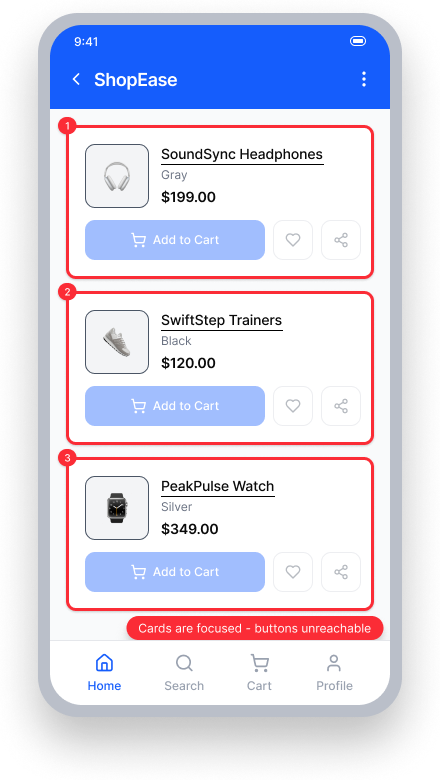
TalkBack focuses each entire card as a single unit
The "Add to Cart", wishlist, and share buttons nested inside each card are unreachable
TalkBack users cannot activate individual controls within the card
Passing Example ✅
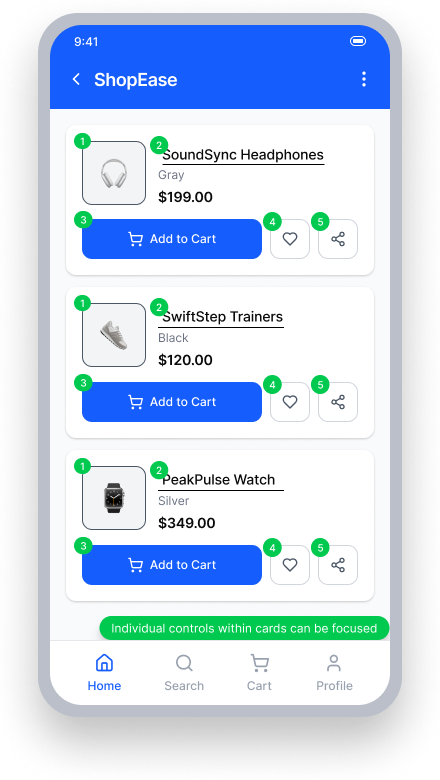
Each control within a card is individually focusable by TalkBack
TalkBack navigates to the image, product name, "Add to Cart", wishlist, and share button as separate elements
Users can activate each action independently
At a Glance
- This rule has a critical impact for users
- An accessibility element should not contain multiple interactive controls that are individually clickable but hidden from assistive technology
- TalkBack can only activate one action per focused element - if multiple controls are nested and hidden, users cannot reach them independently
Impact to Users
People using TalkBack are most impacted. When multiple active controls are nested within a single accessibility element, TalkBack can only activate one of them or may activate the wrong one entirely. This means users may trigger an unintended action, get no response at all, or be completely unable to access certain controls.
Confirm Nested Active Control Issue
- Turn on TalkBack
- Attempt to focus on the control
- Attempt to activate the control
- One of the following will happen:
- Inaccessible: Nothing happens
- Inaccessible: The control is activated, but its focus box contains another control
- Inaccessible: A different control is activated
- Accessible: The control is activated and is the only control in its focus box
Fix Issues
Avoid nested clickable elements. Ensure each clickable item is individually focusable by assistive technology. If a parent element must handle an overall action, child controls should be hidden from assistive technology so users are not presented with conflicting or unreachable interactions.
XML
Do not set the importantForAccessibility property to "no" on clickable elements nested inside a layout. If child controls should not be individually accessible, ensure the parent handles the action and is the only focusable element.
Compose
Avoid the pattern below, where a clickable parent contains children hidden with invisibleToUser() — TalkBack users will not be able to reach the hidden child controls:
Row(modifier = Modifier.clickable { ... }) {
    Text("Settings",
        modifier = Modifier.clickable { ... }
            .semantics {
        invisibleToUser()
    })
    Text("Information",
        modifier = Modifier.clickable { ... }
            .semantics {
        invisibleToUser()
    })
}
If the children have individual actions, ensure the parent is not also clickable. The passing example below shows each child as independently clickable, with a non-clickable parent:
Row {
    Text("Settings",
        modifier = Modifier.clickable { ... })
    Text("Information",
        modifier = Modifier.clickable { ... })
}
React Native
If a child control should not be individually focused, ensure the parent element is accessible and handles the action. Set importantForAccessibility='no-hide-descendants' on the child so it is hidden from assistive technology:
<TouchableOpacity
   style={{flexDirection:'row', alignItems: 'center',}}
   onPress={() => props.navigation.navigate('FocusableTextExample')}
   accessible={true}
   accessibilityLabel={"Purchase items in your shopping cart"}>
     <Button title="Buy"
       importantForAccessibility='no-hide-descendants'
       accessibilityElementsHidden='true'
       adjustsFontSizeToFit={true}
       marginBottom={20}
       titleStyle={{
         color: "white",
         fontSize: 20,
        }}
        buttonStyle={{
          height: 50,
          width: 200
        }}
     />
</TouchableOpacity>
Can I Ignore This Rule?
This rule was disabled with the Android SDK version 9.1.0, and this question is now inapplicable.
Resources
Deque University Course Pages
Note: Full access to Deque University resources requires a subscription.
Other Resources
- Web Content Accessibility Guidelines (WCAG) 2.1, W3C Recommendation
- WCAG 2.1 Understanding Docs