
Focusable Text
Make sure text elements are reachable by VoiceOver


Learn how we're using artificial intelligence for this rule!
What We Check For
All elements containing text should be focusable for assistive technologies such as VoiceOver. Text elements should be marked as accessibility elements, so VoiceOver users can navigate to and read on-screen text.
Failing Example ❌
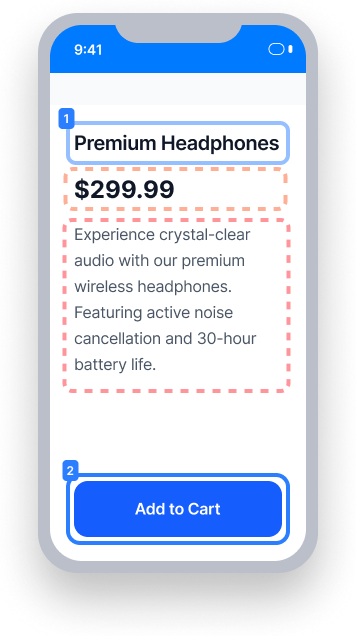
The price and description text are not marked as accessibility elements
VoiceOver skips from "Premium Headphones" directly to "Add to Cart" -
the price and description are never announced
Screen reader users miss critical product information displayed on screen
Passing Example ✅
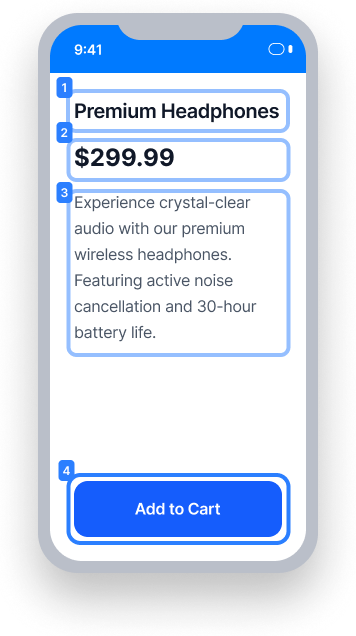
All text elements are marked as accessibility elements and reachable by VoiceOver
VoiceOver navigates through all four elements in sequence: heading, price, description, and button
Screen reader users receive the full product information in a logical reading order
At a Glance
- This rule has a critical impact for users
- Text elements must be marked as accessibility elements for VoiceOver to read them
- In UIKit, set
isAccessibilityElement = trueon the text element to make it focusable - In SwiftUI and React Native, text elements are accessible by default — do not hide them from assistive technology
Impact to Users
People with blindness or low vision are most impacted. When a text element is not marked as an accessibility element, VoiceOver cannot focus on it. As a result, screen reader users will miss information displayed on screen entirely, which can cause confusion or prevent users from accessing important content.
Confirm Focusable Text Issue
- Turn on VoiceOver
- Attempt to focus on the text element
- One of the following will occur:
- Inaccessible: Text element will not be focusable by VoiceOver
- Accessible: Text element is focused and read by VoiceOver
Fix Issues
To resolve a Focusable Text issue, ensure the text element is marked as an accessibility element so VoiceOver can reach and announce it. If the text is part of a focusable parent element (such as a button or labeled control), the parent's accessible name should include the text. In that case, the text element itself does not need to be individually focusable.
UIKit
To fix in Storyboard:
- Navigate to the text element.
- Confirm that the Inspector Panel is visible.
- Select the Identity Inspector.
- Under Accessibility, select the "Enabled" checkbox.
To fix in code, make the text element focusable by VoiceOver:
label.isAccessibilityElement = trueSwiftUI
In SwiftUI, text elements are accessible by default. Confirm the text is meaningful and provides context, and do not hide it by using the accessibility hidden view modifier.
React Native
In React Native, text elements are accessible by default. Confirm the text is meaningful and provides context. Do not turn off accessibility by using the accessible={false} property on the Text element directly, or the accessibilityElementsHidden=true property on a parent element.
Flutter
In Flutter, Text elements are included in the accessibility tree by default. Confirm the text is meaningful and provides context. Do not exclude visible text
from the accessibility tree by wrapping it in ExcludeSemantics or Semantics(excludeSemantics: true).
Can I Ignore This Rule?
Focusable Text has a Critical impact for users, and we strongly recommend fixing these issues. In cases where the text is contained within a parent element that is already focusable by VoiceOver and already includes the text in its accessible name - such as a button label or a control's descriptive text - it may be acceptable to leave the text element itself non-focusable. Learn more about ignoring rules.
Resources
Deque University Course Pages
Note: Full access to Deque University resources requires a subscription.
Other Resources
- Web Content Accessibility Guidelines (WCAG) 2.0, W3C Recommendation
- WCAG 2.0 Understanding Docs