
A11y Element Focus Box
VoiceOver's focus box should fully encapsulate the element it is announcing


What We Check For
An element's accessibility path, or VoiceOver focus box, must fully encapsulate its own visual on-screen frame.
This rule enforces a Deque Best Practice. You can turn off this rule from the Mobile Dashboard or by ignoring the rule in tests written for iOS.
Learn how to turn off rules from the Mobile Dashboard.
Failing Example ❌
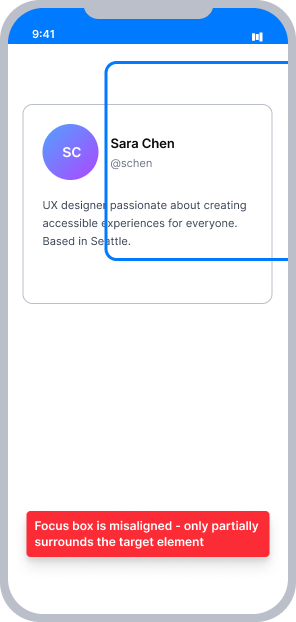
VoiceOver is focused on a button, but the focus box appears offset - partially outside the button's visible bounds
The highlighted area does not match the element being announced, making it difficult for sighted VoiceOver users to follow along
Passing Example ✅
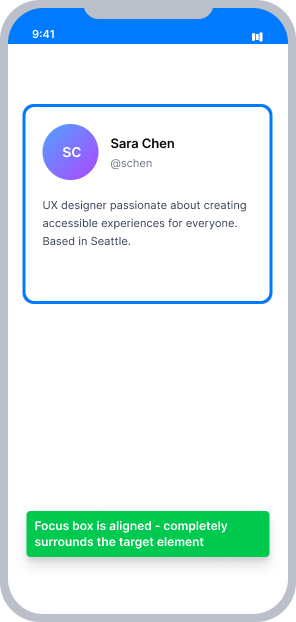
VoiceOver is focused on the same button and the focus box fully contains the element's visual frame
The highlighted area accurately matches what the user sees on screen, giving sighted VoiceOver users a clear visual indicator of what is being focused
At a Glance
- This rule has a Moderate impact for sighted users who also use VoiceOver
- VoiceOver's focus box must match the visual on-screen bounds of the element it is announcing
- Avoid using
accessibilityPathoraccessibilityFrameif possible - VoiceOver calculates the correct frame automatically - If you must override the frame, recalculate coordinates every time the element moves (as when scrolling)
Impact to Users
Sighted users who also utilize VoiceOver are most impacted. VoiceOver will announce the details of an on-screen element, but the focus box will appear partially or entirely outside the element being announced. This disconnect between the spoken content and the visible highlight makes it difficult to follow along and understand what is being focused.
Confirm A11y Element Focus Box Issue
- Turn on VoiceOver
- Focus the element
- One of the following will happen:
- Inaccessible: VoiceOver's focus box will partially contain the element
- Inaccessible: VoiceOver's focus box will not contain the element at all
- Accessible: VoiceOver's focus box will fully contain the element
Fix Issues
Issues found by this rule are almost always caused by incorrect use of accessibilityPath or accessibilityFrame. The safest approach is to remove them and let VoiceOver calculate the focus box automatically. If a custom frame is required, coordinates must be recalculated relative to the root element every time its position changes.
UIKit
Incorrect usage of the accessibilityPath or accessibilityFrame on an element will result in this rule finding an issue. Fix in one of two ways:
- Remove
accessibilityPathoraccessibilityFrameif they are not needed. VoiceOver automatically calculates the on-screen coordinates and draws the correct focus box. - If you must override the frame, convert the element's frame to root view coordinates and reassign the path whenever the element moves (such as in a
UIScrollview):
// Assuming we are in a ViewController
let button = UIButton()

// If not within a ViewController, self.view should be replaced with the rootView of the screen
let rootview = self.view
let onScreenFrame = button.superview!.convert(button.frame, to: rootview)
button.accessibilityPath = UIBezierPath(rect: onScreenFrame)
SwiftUI
This type of accessibility issue is not expected to occur within SwiftUI views.
React Native
This type of accessibility issue is not expected to occur with default Touchable or Pressable elements.
When adding focus to another type of element, set the accessible and accessibilityElementsHidden props directly on that element:
<Image
   source={DequeLogo}
   accessible={true}
   accessibilityElementsHidden={false}
   accessibilityLabel="Deque Systems Logo"
   accessibilityRole="image"
   style={{ width: 100, height: 60 }}
   resizeMode='center'
/>
When elements are grouped within a containing View, set the accessible and accessibilityElementsHidden props on the containing view:
<View
  style={styles.rowContainer}
  accessible={true}
  accessibilityElementsHidden={false}
  accessibilityLabel="Dark Mode"
  accessibilityValue={{ text: "" + secondSwitchIsEnabled }}
  accessibilityRole="switch"
  onTouchStart={() => {
    setSecondSwitchIsEnabled(!secondSwitchIsEnabled)
  }}>
    <Text style={{ fontSize: 18 }}>Dark Mode</Text>
    <Switch
        style={styles.standardSwitch}
        importantForAccessibility='no-hide-descendants'
        value={secondSwitchIsEnabled}
        onValueChange={() => {
          setSecondSwitchIsEnabled(!secondSwitchIsEnabled);
        }}
    />
</View>
Can I Ignore This Rule?
A11y Element Focus Box has a Moderate impact for users. Because this is a Best Practice rule, it can be turned off from the Mobile Dashboard or suppressed in individual tests. However, a misaligned focus box creates a confusing experience for sighted VoiceOver users and is worth fixing when the cause is a misconfigured accessibilityPath or accessibilityFrame. Learn more about ignoring rules.
Resources
Deque University Course Pages
Note: Full access to Deque University resources requires a subscription.
Other Resources
- Web Content Accessibility Guidelines (WCAG) 2.1, W3C Recommendation
- Apple Developer Documentation