
Nested Elements Name
Ensure all visible text within nested child elements is included in the parent's accessible name


What We Check For
Visible text within nested child elements should be included in the parent's accessible name when that text conveys meaningful information or relationships.
Failing Example ❌
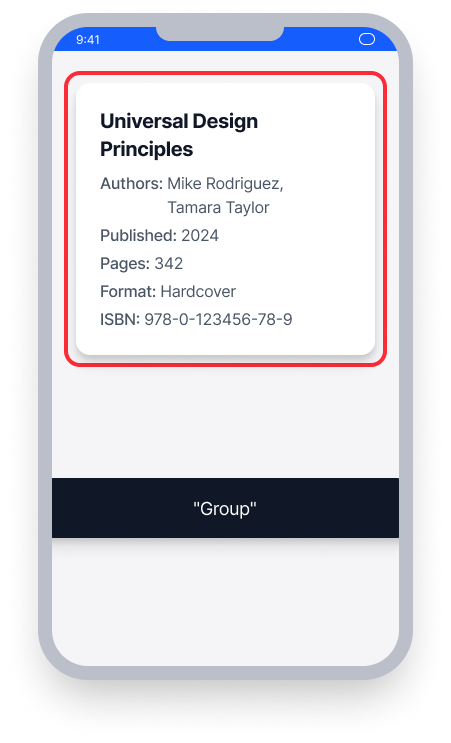
The card is focusable, but child text elements are not included in the container's accessible name
VoiceOver announces only "Group" — none of the visible text (title, authors, date, etc.) is read aloud
Screen reader users have no access to the content that sighted users can read
Passing Example ✅
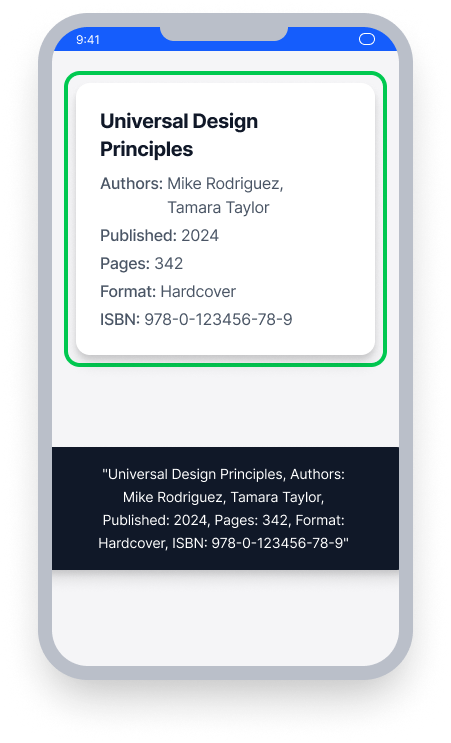
All visible text within the card is included in the container's accessible name
VoiceOver announces the complete content: title, authors, published date, page count, format, and ISBN
Screen reader users receive the same information as sighted users
At a Glance
- This rule has a critical impact for users
- All visible text inside a focusable container must be available to VoiceOver and Voice Control
- In UIKit, explicitly set
accessibilityLabelon the container to include all nested text - In SwiftUI, use
.accessibilityElement(children: .combine)to ensure all child text is announced - In React Native, avoid setting
accessibilityElementsHiddentotrueon visible text elements
Impact to Users
People using VoiceOver are most impacted by Nested Elements Name issues. When multiple elements are grouped together inside of a container, VoiceOver may not read all the text within the container - especially if individual text elements are hidden from assistive technology. This means people relying on VoiceOver may be unaware of important on-screen content that is available to sighted users.
Confirm Nested Elements Name Issue
- Turn on VoiceOver
- Focus on the accessibility element containing the text
- One of the following will happen:
- Inaccessible: VoiceOver will not read all visible text within the focus area
- Accessible: VoiceOver will read all text contained within the focus area
Fix Issues
To resolve Nested Elements Name issues, ensure that all visible text within a focusable container is available to assistive technology. Avoid explicitly hiding text elements from VoiceOver or Voice Control when they contain content sighted users can perceive.
UIKit
An issue found by this rule is caused by using the default accessibilityLabel for an accessibility element containing multiple text elements.
To fix, explicitly set the container's accessibilityLabel to include all visible text:
let paragraphOne = UILabel()
let paragraphTwo = UILabel()
let accessibilityElement = UIView()

paragraphOne.text = "One paragraph of text about something."
paragraphTwo.text = "A second paragraph of text about something."

accessibilityElement.addSubviews([paragraphOne, paragraphTwo])

// Update the accessibility element's accessibilityLabel, so both paragraphs are read by VoiceOver.
view.accessibilityLabel = "\(paragraphOne.text) \(paragraphTwo.text)"
SwiftUI
An issue found by this rule within SwiftUI indicates misuse of the accessibilityElement modifier in addition to the accessibilityElement(children:..) modifier.
Use these modifiers on a grouping view rather than individual elements. Note the order and AccessibilityChildBehavior specified below.
VStack(alignment: .leading) {
    HStack {
      Text("Title:")
      book.title.map({ title in
        Text(title)
      })
    }
    HStack {
      Text("Author:")
      book.author.map({ author in
        Text(author)
      })
    }

    HStack {
      Text("Genre:")
      book.genre.map({ genre in
        Text(genre)
      })
    }
}
.accessibilityElement()
.accessibilityElement(children: .combine)
React Native
An issue found by this rule in apps built with React Native indicates a misuse of the accessible property and/or accessibilityElementsHidden property. If you are explicitly setting these properties, ensure they are NOT configured in a way that hides visible text from assistive technology.
Flutter
When a container groups multiple pieces of text, ensure all visible text is exposed to the screen reader. Use MergeSemantics to combine child text nodes into a single accessible name.
// Failing — ExcludeSemantics hides visible text from the screen reader
Semantics(
  label: 'Item name: Widget',
  child: Column(
    children: [
      const Text('Item name: Widget'),
      ExcludeSemantics(child: const Text('Price: \$9.99')),
      ExcludeSemantics(child: const Text('In stock')),
    ],
  ),
)

// Passing — MergeSemantics combines all child text into one node
// Screen reader announces "Item name: Widget, Price: $9.99, In stock"
MergeSemantics(
  child: Column(
    children: [
      const Text('Item name: Widget'),
      const Text('Price: \$9.99'),
      const Text('In stock'),
    ],
  ),
)
Can I Ignore This Rule?
Nested Elements Name has a Critical impact for users, and we strongly recommend taking steps to remediate this issue. In rare cases, some text within a container may be intentionally decorative or redundant — but this should be the exception, not the default. Learn more about ignoring rules.
Resources
Deque University Course Pages
Note: Full access to Deque University resources requires a subscription.
Other Resources
- Web Content Accessibility Guidelines (WCAG) 2.0, W3C Recommendation
- WCAG 2.0 Understanding Docs