
Nested Element Name
Ensure all visible text in a container is accessible to screen readers
This rule is now disabled and will be removed, at least temporarily, at a later date.


Learn how we're using artificial intelligence for this rule!
What We Check For
A focusable element should have all visible text within its accessible name available for assistive technologies such as TalkBack and Voice Access.
Failing Example ❌
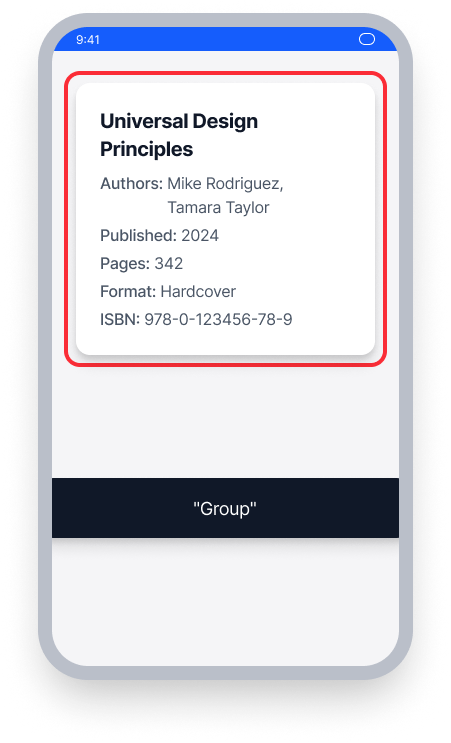
The card is focusable, but child text elements are hidden from assistive technology
TalkBack announces only "Group" - none of the visible text (title, authors, date, etc.) is read aloud
Screen reader users have no access to the content that sighted users can read
Passing Example ✅
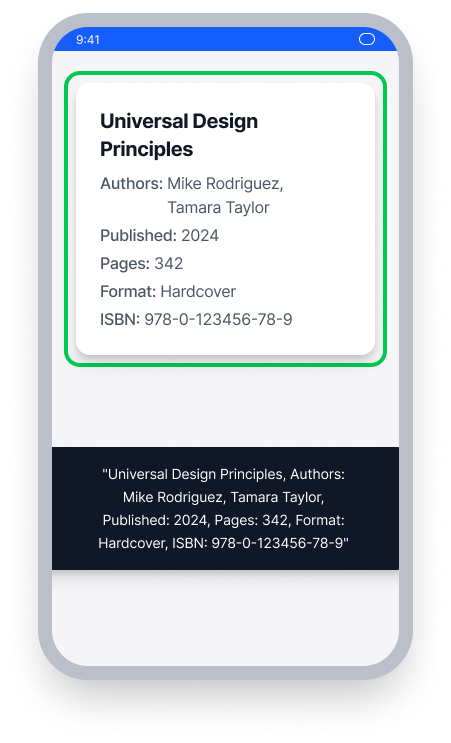
All visible text within the card is available to assistive technology
TalkBack announces the complete content: title, authors, published date, page count, format, and ISBN
Screen reader users receive the same information as sighted users
At a Glance
- This rule has a critical impact for users
- All visible text inside a focusable container must be available to TalkBack and Voice Access
- Avoid setting
importantForAccessibility="no"on text elements that sighted users can perceive - In Compose, avoid using
invisibleToUser()on Text elements that are visible on screen - In React Native, avoid setting
importantForAccessibilitytono-hide-descendantson visible text
Impact to Users
People using TalkBack are most impacted by Nested Element Name issues. When multiple elements are grouped together inside of a container, TalkBack may not read all the text within the container - especially if individual text elements are hidden from assistive technology. This means people relying on TalkBack may be unaware of important on-screen content that is available to sighted users.
Confirm Nested Element Name Issue
- Turn on TalkBack
- Focus on the accessibility element containing the text
- One of the following will happen:
- Inaccessible: TalkBack will not read all visible text within the focus area
- Accessible: TalkBack will read all text contained within the focus area
Fix Issues
To resolve Nested Element Name issues, ensure that all visible text within a focusable container is available to assistive technology. Avoid explicitly hiding text elements from TalkBack or Voice Access when they contain content sighted users can perceive.
XML
Avoid setting the importantForAccessibility property on text views to no. All users should have the same access to text on the screen, regardless of whether or not they are using assistive technology.
Compose
Avoid marking Compose Text elements as invisibleToUser. All users should have the same access to text on the screen, regardless of whether or not they are using assistive technology.
In the example below, remove invisibleToUser to ensure views are available to people using assistive technology.
Row {
    Text("Welcome to Deque")
    Text("I am a text element.", modifier = Modifier.semantics {
        // Omit the API below to make your Text elements accessible
        invisibleToUser()
    })
}
React Native
An issue found by this rule in apps built with React Native indicates a misuse of the importantForAccessibility property. If using the property, ensure it is NOT set to no-hide-descendants.
Flutter
When a container groups multiple pieces of text, ensure all visible text is exposed to the screen reader. Use MergeSemantics to combine child text nodes into a single accessible name.
// Failing — ExcludeSemantics hides visible text from the screen reader
Semantics(
  label: 'Item name: Widget',
  child: Column(
    children: [
      const Text('Item name: Widget'),
      ExcludeSemantics(child: const Text('Price: \$9.99')),
      ExcludeSemantics(child: const Text('In stock')),
    ],
  ),
)

// Passing — MergeSemantics combines all child text into one node
// Screen reader announces "Item name: Widget, Price: $9.99, In stock"
MergeSemantics(
  child: Column(
    children: [
      const Text('Item name: Widget'),
      const Text('Price: \$9.99'),
      const Text('In stock'),
    ],
  ),
)
Can I Ignore This Rule?
This rule was disabled with the Android SDK version 9.1.0, and this question is now inapplicable.
Resources
Deque University Course Pages
Note: Full access to Deque University resources requires a subscription.
Other Resources
- Web Content Accessibility Guidelines (WCAG) 2.0, W3C Recommendation
- WCAG 2.0 Understanding Docs