
Screen Orientation
Support all users' preferred screen orientation


What We Check For
Your app should not restrict the user's preferred display orientation. For example, if a user has their device set to landscape mode, the app should rotate to match - not stay locked in portrait mode.
Failing Example ❌
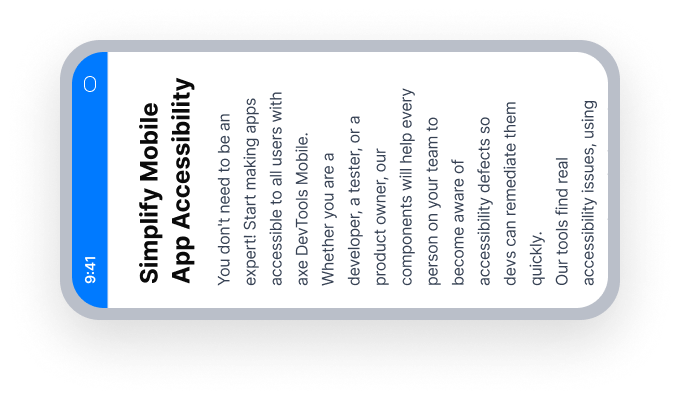
The app stays in portrait mode even when the device is rotated to landscape
Users with devices mounted in a fixed landscape orientation cannot use the app
Passing Example ✅
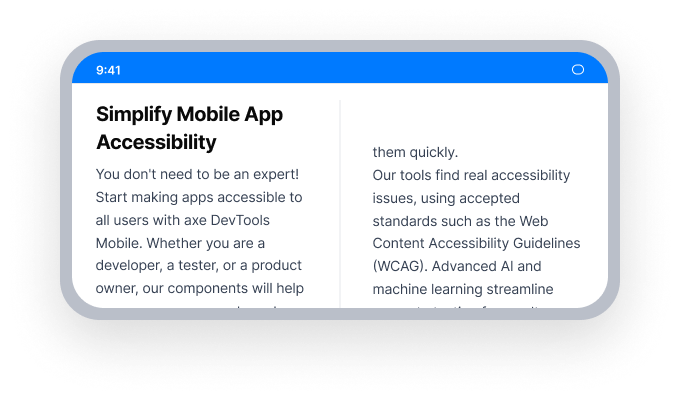
The app rotates to landscape mode when the device is rotated
Users with devices mounted in any orientation can fully use the app
At a Glance
- This rule has a serious impact for users
- Do not lock your app to a single orientation
- Remove any hard-coded orientation restrictions in your manifest or activity code
Impact to Users
Some people have a phone or tablet mounted in a fixed orientation. If the app cannot support that orientation, it becomes unusable for the user.
Confirm Screen Orientation Issue
- Rotate the device 90 degrees, from portrait mode to landscape mode
- One of the following will happen:
- Inaccessible: The display will stay in portrait mode and not rotate to landscape mode.
- Accessible: The display will rotate from portrait mode to landscape mode.
Fix Issues
Native Android
Allow your application to support any orientation by removing hard-coded orientation restrictions. Common places to check:
- In
AndroidManifest.xml, remove or update thescreenOrientationattribute on any<activity>element:
<!-- Remove or change this -->
android:screenOrientation="portrait"- In activity code, remove any calls to
setRequestedOrientation:
// Remove this
this.setRequestedOrientation(ActivityInfo.SCREEN_ORIENTATION_PORTRAIT);
Flutter
Do not restrict the app to a single orientation using SystemChrome.setPreferredOrientations.
// Failing — locked to portrait only
SystemChrome.setPreferredOrientations([
  DeviceOrientation.portraitUp,
  DeviceOrientation.portraitDown,
]);

// Passing — all orientations allowed
SystemChrome.setPreferredOrientations(DeviceOrientation.values);
Can I Ignore This Rule?
Screen Orientation has a Serious impact for users. We recommend remediating this issue in nearly all cases. If your app is specifically designed for a device that is physically constrained to one orientation (such as a point-of-sale terminal), ignoring this rule may be appropriate. Learn more about ignoring rules.
Resources
- Web Content Accessibility Guidelines (WCAG) 2.1, W3C Recommendation
- WCAG 2.1 Understanding Docs