
Touch Target Size
Ensure interactive controls are large enough to tap accurately


Learn how we're using artificial intelligence for this rule!
What We Check For
All interactive elements should have a minimum size of 44dp by 44dp, for both the visual and tappable areas.
The touch area of an interactive element can potentially be expanded beyond its visual bounds — for example, by using a TouchDelegate to increase the active touch region. After careful consideration, Deque maintains that it's best practice to have the visual and interactive bounds of the target align. This gives the end-user a clear area to engage with for the best chance of success. Therefore, this rule is also testing that the visual bounds of interactive elements meet the minimum 44dp.
Failing Example ❌
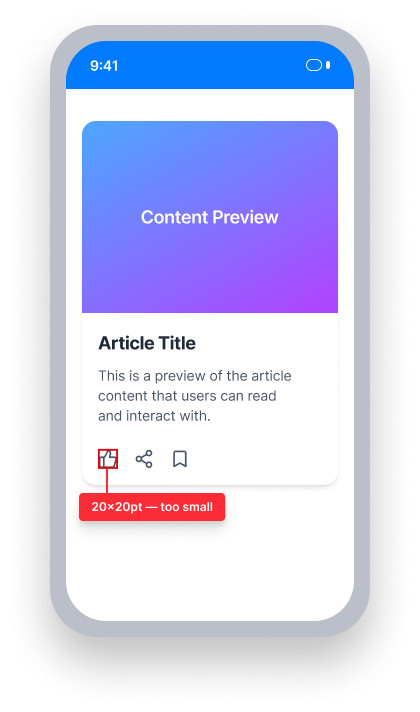
Touch target size = 20dp × 20dp
This element is smaller than the 44dp × 44dp minimum
The tap area is too small to reliably activate, especially for users with motor limitations.
Passing Example ✅
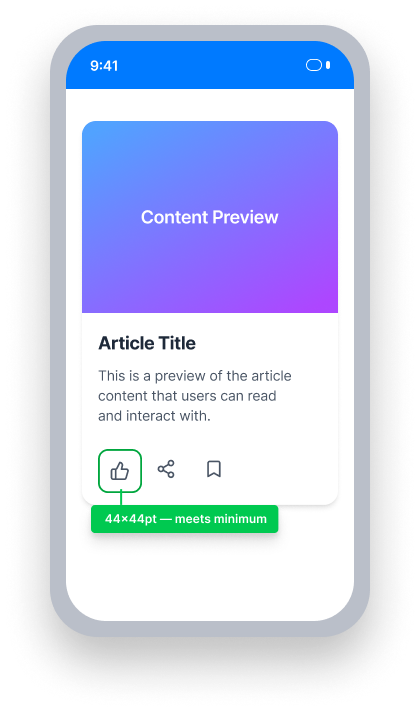
Touch target size = 44dp × 44dp
This element meets the 44dp × 44dp minimum
Both the visual and tappable bounds are large enough to activate accurately.
At a Glance
- This rule has a moderate impact for users
- All interactive elements must have a visual and tappable size of at least 44dp × 44dp
- Both the visual and interactive (hit area) bounds must meet the minimum
- Small controls are a usability problem for everyone, and especially problematic for users with motor limitations
Impact to Users
On a touch device, small controls are a usability issue for everyone. Additionally, people experiencing motor limitations have increased difficulty interacting with, and aiming for, small targets.
Confirm Touch Target Size Issue
Run the application and navigate to the screen containing the element to test.
- In Android Studio, open the Layout Inspector (Tools > Layout Inspector)
- Select the element to test in the component tree or canvas
- In the Attributes panel, observe the
widthandheightvalues in dp - If necessary, identify the device's pixel density to confirm dp values
If either dimension is less than 44dp, the element fails this rule.
Fix Issues
To resolve Touch Target Size issues, ensure that the visual size of each interactive element is at least 44dp × 44dp. Both the visual bounds and the tappable hit area should match — expanding only the touch area via TouchDelegate alone is not sufficient.
An issue found by this rule occurs when the height and/or width values of an interactive element are not 44dp or more.
XML
Set minimumHeight and minimumWidth on the element, or set explicit layout_width and layout_height values of at least 44dp.
Button button = findViewById(R.id.my_button);
button.setMinimumHeight(44);
button.setMinimumWidth(44);<Button
android:id="@+id/an_accessible_button_yay"
android:minimumHeight="44dp"
android:minimumWidth="44dp"
android:text="@string/batman_likes_accessible_buttons" />Compose
Use a Modifier.size or Modifier.defaultMinSize to set a minimum size of at least 44dp × 44dp.
Button(
     onClick = { },
     modifier = Modifier.size(width = 44.dp, height = 44.dp)
) {
     Text(text = "Scan for Issues")
}
React Native
Use platform-specific size properties to ensure controls meet the minimum touch target size.
Some components from React Native are not customizable to allow for size adjustments, such as the Button component.
If possible, ensure all interactive elements are at least 44dp by 44dp. If not possible, explore alternative components that do allow you to adjust the size.
Tip: When using custom controls, be sure the accessibility role is set properly!
Flutter
Flutter's Material widgets (ElevatedButton, IconButton, etc.) enforce a 48dp by 48dp minimum touch area automatically, so they meet this requirement by default. Violations typically come from custom tap targets built with GestureDetector, which does not expand the tap area beyond the visual size.
  // Failing — tap target is only 24×24
  GestureDetector(
    onTap: () {},
    child: Container(
      width: 24,
      height: 24,
      color: Colors.blue,
      child: const Icon(Icons.close, size: 16, color: Colors.white),
    ),
  )

  // Passing — tap target meets 44×44 minimum
  GestureDetector(
    onTap: () {},
    child: Container(
      width: 44,
      height: 44,
      color: Colors.blue,
      child: const Icon(Icons.close, size: 24, color: Colors.white),
    ),
  )
Can I Ignore This Rule?
Touch Target Size has a Moderate impact for users. In cases where a design constraint prevents meeting the 44dp minimum — such as a toolbar icon in a very dense interface — document the decision and explore alternatives before ignoring the rule. Learn more about ignoring rules.
Resources
Deque University Course Pages
Note: Full access to Deque University resources requires a subscription.
Other Resources
- Web Content Accessibility Guidelines (WCAG) 2.1, W3C Recommendation
- WCAG 2.1 Understanding Docs