
Focusable Text
Make sure text elements are reachable by TalkBack


Learn how we're using artificial intelligence for this rule!
What We Check For
All elements containing text should be focusable for assistive technologies such as TalkBack. Text elements should not be hidden from assistive technology, so users can navigate to and read on-screen text.
Failing Example ❌
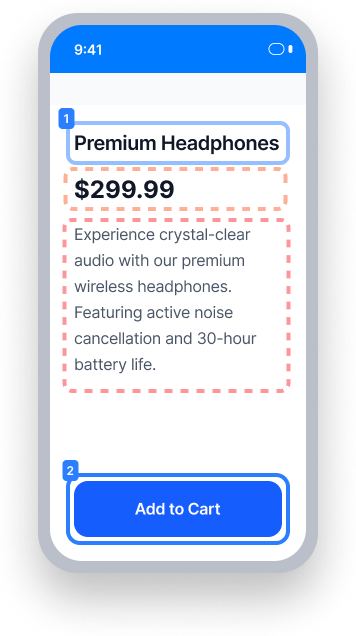
The price and description text are hidden from assistive technology
TalkBack skips from "Premium Headphones" directly to "Add to Cart" — the price and description are never announced
Screen reader users miss critical product information displayed on screen
Passing Example ✅
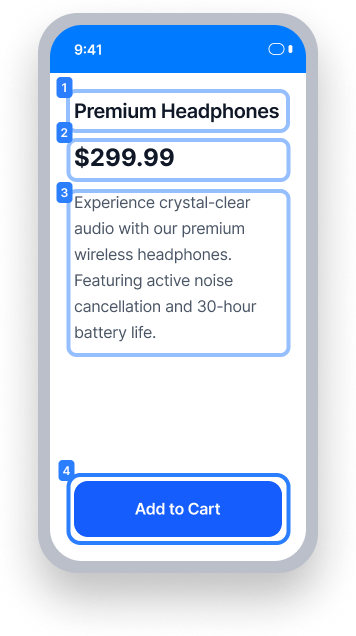
All text elements are available to assistive technology and reachable by TalkBack
TalkBack navigates through all four elements in sequence: heading, price, description, and button
Screen reader users receive the full product information in a logical reading order
At a Glance
- This rule has a critical impact for users
- Text elements must not be hidden from assistive technology for TalkBack to read them
- In XML, do not set
importantForAccessibility="no"on text elements - In Compose, do not mark text elements as
invisibleToUser() - In React Native, text elements are accessible by default; so do not hide them from assistive technology
Impact to Users
People with blindness or low vision are most impacted. When a text element is hidden from accessibility, TalkBack cannot focus on it. As a result, screen reader users will miss information displayed on screen entirely, which can cause confusion or prevent users from accessing important content.
Confirm Focusable Text Issue
- Turn on TalkBack
- Attempt to focus on the text element
- One of the following will occur:
- Inaccessible: Text element will not be focusable by TalkBack
- Accessible: Text element is focused and read by TalkBack
Fix Issues
To resolve a Focusable Text issue, ensure the text element is not explicitly hidden from assistive technology. If the text is part of a focusable parent element (such as a button or labeled control), the parent's accessible name should include the text. In that case, the text element itself does not need to be individually focusable.
XML
Do not set the importantForAccessibility property to "no" on text elements. If this attribute is present, remove it or set it to "yes" or "auto".
Compose
Do not mark Compose text elements as invisibleToUser(). Remove this modifier to ensure the element is available to TalkBack.
Text("Digital equality for all.", modifier = Modifier.semantics {
    // Remove invisibleToUser() to make this element accessible to TalkBack
    invisibleToUser()
})
React Native
In React Native, text elements are accessible by default. Confirm the text is meaningful and provides context. Do not turn off accessibility by using the accessible={false} property on the Text element directly, or the importantForAccessibility='no-hide-descendants' property on a parent element.
Flutter
In Flutter, Text elements are included in the accessibility tree by default. Confirm the text is meaningful and provides context. Do not exclude visible text
from the accessibility tree by wrapping it in ExcludeSemantics or Semantics(excludeSemantics: true).
Can I Ignore This Rule?
Focusable Text has a Critical impact for users, and we strongly recommend fixing these issues. In cases where the text is contained within a parent element that is already focusable by TalkBack and already includes the text in its accessible name - such as a button label or a control's descriptive text - it may be acceptable to leave the text element itself non-focusable. Learn more about ignoring rules.
Resources
Deque University Course Pages
Note: Full access to Deque University resources requires a subscription.
Other Resources
- Web Content Accessibility Guidelines (WCAG) 2.0, W3C Recommendation
- WCAG 2.0 Understanding Docs